Petrophys
Docs Tutorials API
Open-source formation evaluation

From well logs to defensible interpretations.

Petrophys turns logs, core, and specialist data into traceable petrophysical results — every executed step recorded, every skip explained. Built for petrophysicists, and for the LLM agents that work beside them.


$ pip install petrophys
Run the quickstart Browse the API LLM agents
Python 3.10–3.13  ·  LAS · DLIS · CSV  ·  core · NMR · images  ·  MCP for LLM agents  ·  open source
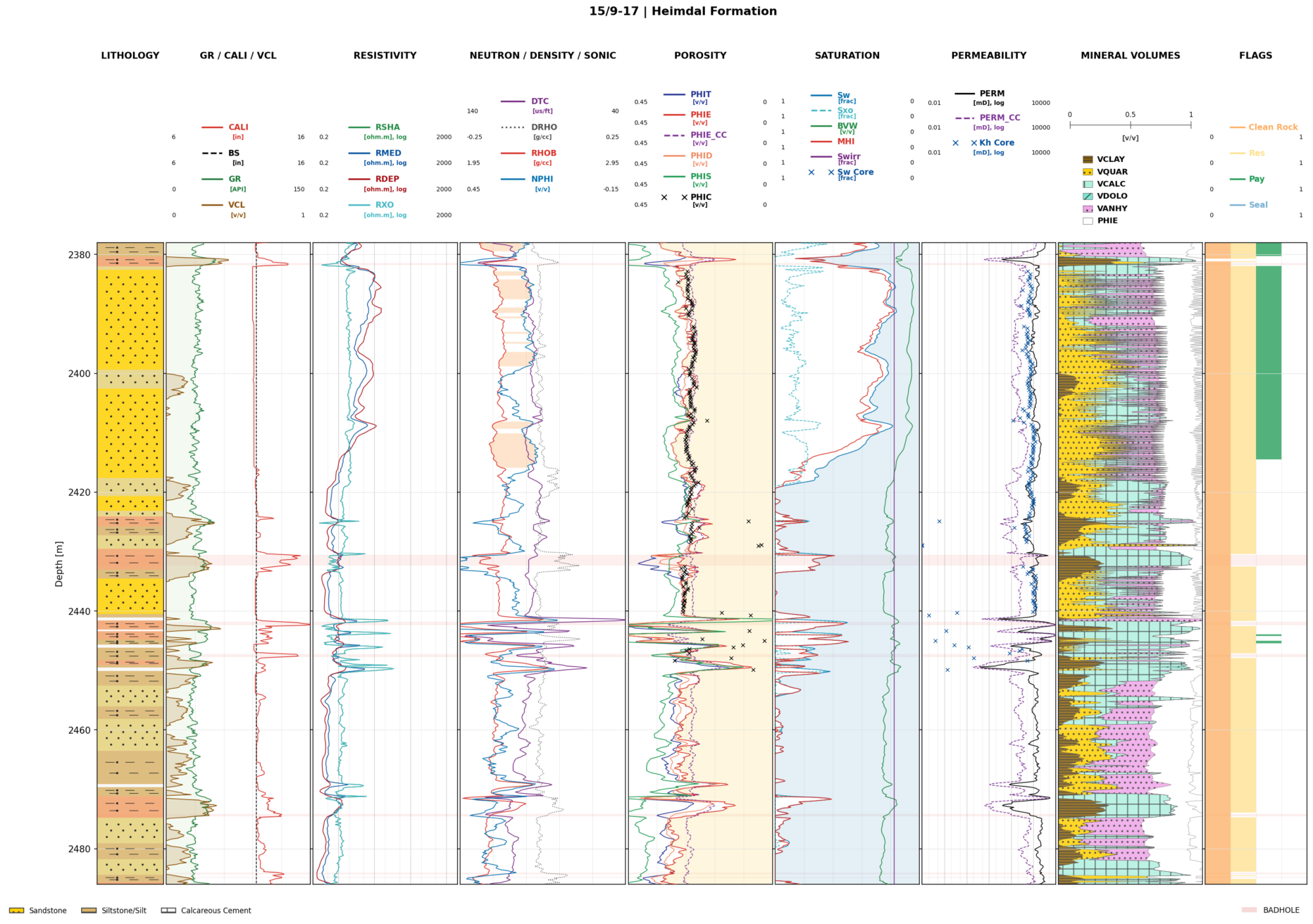
15/9-17 · Heimdal Fm — multi-track interpretation
Multi-track Petrophys interpretation of the Heimdal Formation
20 executed 4 skipped 1 warning result.print_trace()
Developed by
MBZUAI Institute of Foundation Models
In collaboration with
Inception
Input-aware, not all-or-nothing

Every decision on the record.

Incomplete log suites don’t fail — they produce a reduced interpretation with an explicit trace. Prerequisites are checked before each step, so the result explains what ran, what couldn’t, and what needs review.

Method, inputs, outputs, and parameters recorded per step
Skips carry reasons — never silent gaps or invented defaults
Warnings route your attention to assumptions worth checking
DynamicWorkflowResult · 30_6-5
status: interpreted
executed
vclay
GR + N-D → VCL · SP reported
executed
porosity
RHOB + NPHI + DTC → PHIT, PHIE
skipped
hc_correction
apply_hc_correction=False (opt-in)
review
saturation
archie + indonesia · Rw 0.07 ohm.m input — check warnings
result.print_trace() · result.specific_steps_skipped · result.to_json()
How data moves

One lifecycle, five stages.

01
Read
LAS, DLIS, CSV, ASCII, core, tops, and specialist channels
02
Standardize
Aliases, units, nulls, ranges, wellbore quality, provenance
03
Interpret
VCL, lithology, porosity, electrical properties, Sw, permeability
04
Evaluate
Rock quality, flow units, flags, intervals, volumetrics
05
Explain
Computed curves, traces, plots, summaries, export packages
Capabilities

What’s in the library.

Real-world inputs
LAS, tabular logs, optional DLIS — plus core measurements, formation tops, NMR, borehole images, and geochemistry.
Data and depth →
Preparation & QC
Mnemonic aliases, unit conversion, null and range screening, washout detection, normalization, and curve imputation.
What Petrophys can do →
Formation evaluation
Clay volume, lithology and mineral volumes, porosity, electrical properties, saturation, permeability, temperature.
Workflows →
Specialist interpretation
NMR distributions, borehole-image arrays, spectral gamma, elemental spectroscopy, saturation height, sonic saturation.
Specialist data →
Reservoir evaluation
BVW, moveable-hydrocarbon indicators, RQI and FZI, flow units, net rock to net pay, volumetrics, interval summaries.
Foundation lessons →
Plots & delivery
Adaptive log panels, triple combos, crossplots, Pickett plots, multiwell charts — and auditable LAS, CSV, Excel, JSON exports.
Visualization & reporting →
For LLMs and agents

A petrophysics engine your agent can call.

Language models know the vocabulary of formation evaluation but cannot compute it. Petrophys gives them the engine: through its MCP server an agent loads a well, runs the same validated workflow as pp.interpret, reads why each step ran or was skipped, and answers with numbers it can trace. The wells stay on your machine.

Claude, ChatGPT, Cursor, VS Code and Codex connect over MCP, on your machine or over HTTP with a token
An invalid setting comes back with the accepted values, so the model corrects itself
Files stay inside the folders you allow; read-only tools are marked as such
$petrophys-mcp config claude-code --root ./wells
MCP session · petrophys-mcp
you
—
Where is the pay in the Brent Group of 30/6-5? Rw is 0.07 ohm.m at 230 °F.
call
load_sample_well
name="30_6-5", with geology
call
interpret_well
Rw 0.07 ohm.m at 230 degF · summary 2841–2958 m
returns
—
status, net thickness, skipped steps and warnings with their reasons, assumptions in plain words, review notes
call
plot_well
the Brent Group panel
agent
—
answers with the net pay, citing the steps and settings behind each number
petrophys://guide · petrophys://settings · petrophys://workflow-steps
Tools for the whole workflow
Load and describe wells, check data quality, interpret one well or a whole field, run your own workflows, explain any step, summarize zones, plot, and find and call any public function of the library.
LLM agents →
Context that fits a prompt
pp.export_context packs an interpretation into compact JSON within a byte budget you set; dataset profiles reproduce the benchmark context packages for GeoLink, COSTA and the Danish wells.
Context export →
Made for code assistants
llms.txt maps the documentation for a model, and config_schema() describes every setting as data, so generated code calls the library correctly.

llms.txt →
PetroHarness
Pair it with PetroHarness
An agentic harness that makes formation evaluation auditable and more accurate.
Ask about a well in plain language: a language model investigates it step by step, Petrophys does every calculation, and every number in the answer traces back to the log. On WellLogBench, the models we tested score higher with it.
GitHub →Website →Documentation →
$ pip install petroharness
$ petroharness --launch-ui

WellLogBench, a benchmark of LLM reasoning on well logs, builds its well contexts with Petrophys.

Quickstart

Start with a bundled well.

import petrophys as pp

well = pp.read(pp.sample("30_6-5"))
result = pp.interpret(well, rw=0.07, rw_meas_temp_f=230)

result.print_trace()                     # what ran, what didn't, and why
pp.plot(result, top=2800, bottom=3000).show()
result.to_las("interpreted.las")
01
A status and a step-by-step trace
Executed, skipped, and review-flagged steps with methods and parameters.
02
Computed curves on the same well
VCL, PHIE, SW, PERM, and flags attached to the well’s own depth index.
03
Export-ready delivery packages
LAS, CSV, Excel, and JSON with calculation provenance included.
Full quickstart →
Petrophys
MBZUAI Institute of Foundation Models Inception
GitHub Documentation © 2026 MBZUAI · Inception AI