1. What you need
| Python | 3.10 or later, on macOS, Windows or Linux |
| For WellLogLLM on your computer | Ollama 0.40.4 or later, and 16 GB of memory or more. A GPU is used when there is one: Apple silicon, NVIDIA or AMD |
| For WellLogLLM on a GPU server | Linux with an NVIDIA GPU (40 GB or more for WellLogLLM-7B), and vLLM 0.30 or later |
| For a hosted model | an OpenRouter API key |
You need one of the last three: where the model runs is your choice, and you can change it at any time.
2. Install PetroHarness
In a virtual environment of its own:
macOS and Linux
python3 -m venv ~/petroharness
source ~/petroharness/bin/activate
pip install petroharness
Windows (PowerShell)
py -3 -m venv $HOME\petroharness
& $HOME\petroharness\Scripts\Activate.ps1
pip install petroharness
Petrophys, which does the petrophysics, comes with it. To check:
python -c "import petroharness, petrophys; print(petroharness.__version__, petrophys.__version__)"
pipx install petroharness installs the petroharness command in an environment of its own, in one step. To change
the code, install from a clone instead (Development).
3. Choose where the model runs
| Where | Choose it when | Model |
|---|---|---|
| On this computer | you want your data to stay on your computer, with no GPU needed (a Mac's GPU is used) | WellLogLLM-3.7B, GGUF, in Ollama |
| On a GPU server | you have an NVIDIA GPU, on this computer or one you reach | WellLogLLM-7B or WellLogLLM-3.7B in full precision, in vLLM; or any model vLLM serves |
| OpenRouter | you want a hosted model and nothing to install | any model OpenRouter lists |
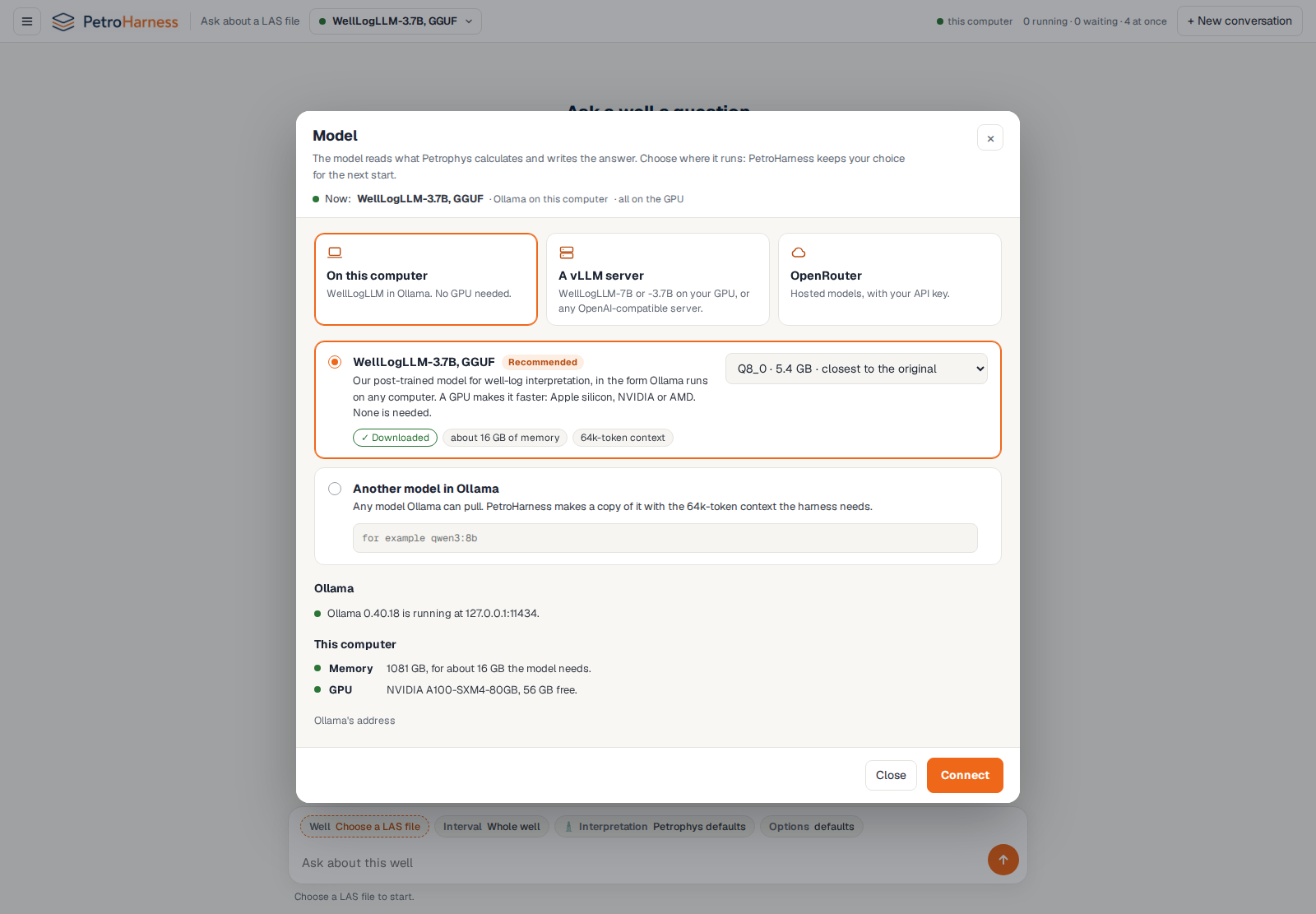
The web UI's Model dialog (top right of the page, on the model's name) sets up each of them, and PetroHarness keeps
the choice: the next petroharness --launch-ui, and the petroharness command, start with it.
3a. WellLogLLM on this computer (Ollama)
1. Install Ollama and start it.
| System | Install | Start |
|---|---|---|
| macOS | download the app from ollama.com/download | open the Ollama app |
| Windows | download the installer from ollama.com/download | it starts on its own after installing |
| Linux | curl -fsSL https:// |
it starts as a service; else run ollama serve |
ollama --version says the version: 0.40.4 or later runs WellLogLLM.
2. Launch the UI:
petroharness --launch-ui
The page opens at http://localhost:7860. A bar under the top bar shows WellLogLLM-3.7B downloading (5.4 GB, once), then the model's name turns green: ask your first question. If Ollama is not running, the Model dialog opens and says what to do; once Ollama runs, Check again and Download and connect finish the job.
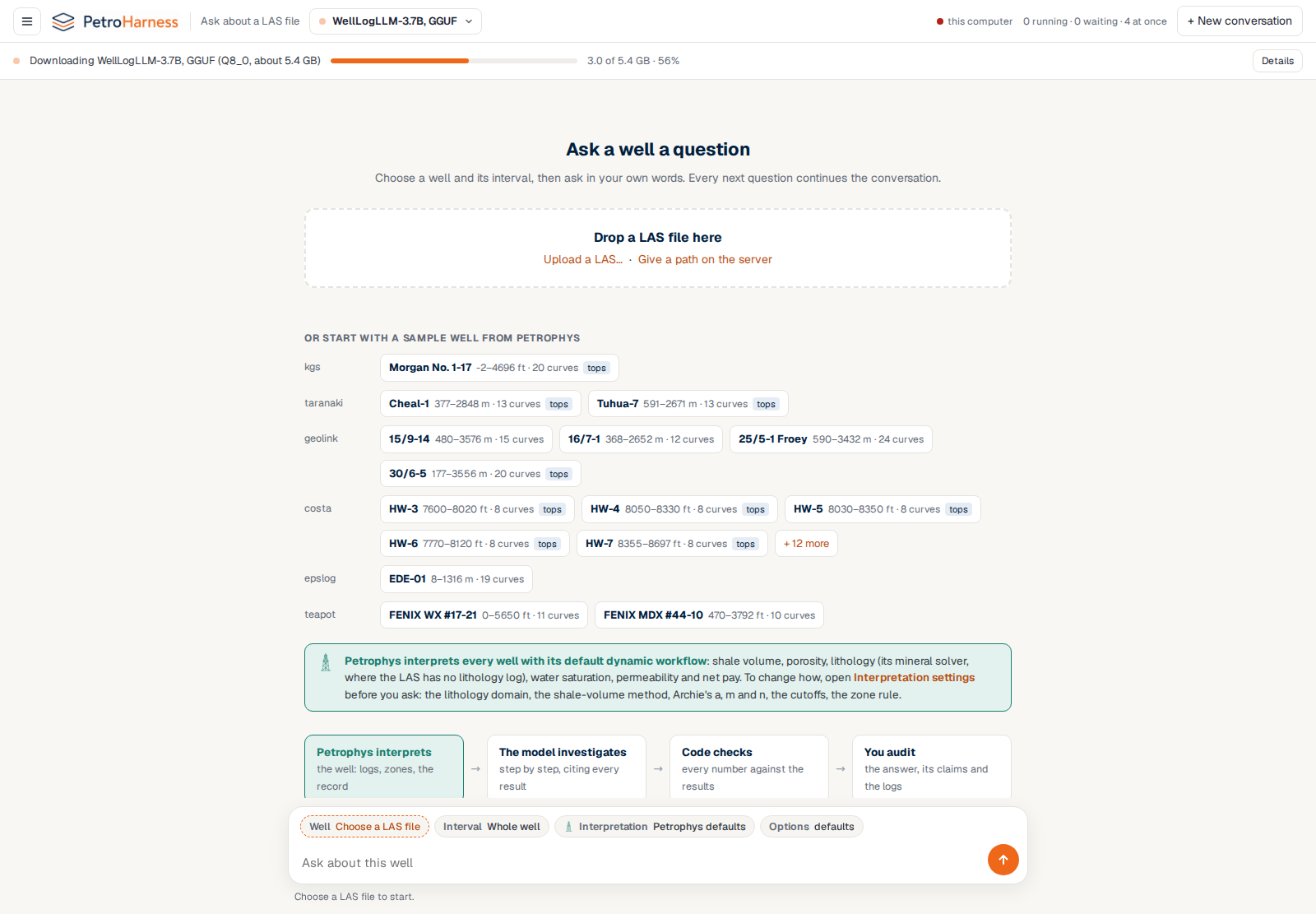
What PetroHarness does. It asks Ollama to pull the GGUF from Hugging Face
(sambal/), then makes a copy of it,
welllogllm-3., with the 65,536-token context the harness needs (Ollama's own default is far smaller). Both
steps happen once; later starts find the copy and go straight on. By hand, the same is:
ollama pull hf.co/sambal/WellLogLLM-3.7B-GGUF:Q8_0
then a copy with PARAMETER num_ in its Modelfile. The packaged model card welllogllm_ calls it.
Sizes. The dialog offers four quantizations of WellLogLLM-3.7B. A smaller file runs in less memory, at some cost in accuracy; Q8_0 is the closest to the original. WellLogLLM-7B, the larger model, is for a GPU server (section 3b): on a computer without one, it would run far too slowly.
| Quantization | Download | Same top token as the original |
|---|---|---|
| Q8_0 (default) | 5.4 GB | 97.1% |
| Q6_K | 4.2 GB | 94.3% |
| Q5_K_M | 3.6 GB | 91.5% |
| Q4_K_M | 3.2 GB | 85.3% |
The last column compares each file with the unquantized model, token by token, on 57,344 tokens of these pages: how
often both would write the same next token (llama.cpp's llama-perplexity --kl-divergence).
Whichever you choose, the 65,536-token context takes about 9.7 GB of memory on top of the model (147,456 bytes a token), so plan on 16 GB of memory or more. A GPU makes the model write far faster: on an NVIDIA A100, Ollama wrote 70 to 134 tokens a second with WellLogLLM-3.7B in Q8_0.
On a Mac. On Apple silicon, Ollama runs WellLogLLM-3.7B on the Mac's GPU through Metal (the GPU PyTorch reaches
as mps), with nothing to set up. The CPU and the GPU share the Mac's memory, so a 16 GB Mac is short for
WellLogLLM-3.7B in Q8_0 with the 64k-token context: Ollama may run part of it on the CPU, and the dialog says when it
does. A
Mac with an Intel processor runs the model on the CPU.
What the dialog checks. Before it connects, the dialog checks this computer for the model and size you chose: its memory, its GPU (an Apple silicon, NVIDIA or AMD GPU; NVIDIA's free memory), and the disk space where Ollama keeps models. What is not ideal is marked, with what to do; only a disk without room for the download stops it. Once connected, PetroHarness loads the model and says where Ollama put it ("all on the Mac's GPU (Metal)", "60% on the GPU, 40% on the CPU", "on the CPU"); a model not all on the GPU is marked in the top bar, and the command says it too.
Another model in Ollama. In the dialog, Another model in Ollama takes any model's name (qwen3:8b): Ollama
pulls it if it does not have it, and PetroHarness makes the same 64k-context copy.
3b. WellLogLLM on a GPU server (vLLM)
On Linux with an NVIDIA GPU, serve WellLogLLM in full precision (BF16) with vLLM 0.30 or later:
| Model | GPU memory | Hugging Face | Served as |
|---|---|---|---|
| WellLogLLM-7B | 40 GB or more | sambal/ |
welllogllm-7b |
| WellLogLLM-3.7B | 24 GB or more: its weights (10.1 GB) and its 64k-token context (9.7 GB) | sambal/ |
welllogllm-3.7b |
The model downloads from Hugging Face the first time. For WellLogLLM-7B:
pip install "vllm>=0.30"
vllm serve sambal/WellLogLLM-7B --served-model-name welllogllm-7b --port 8000 \
  --max-model-len 65536 --trust-remote-code \
  --reasoning-parser k2_horizon --chat-template-content-format string
For WellLogLLM-3.7B, use sambal/ and --served-model-name welllogllm-3.. The Model dialog shows
both commands, with a Copy button. vLLM runs on Linux with an NVIDIA GPU; on a Mac, run WellLogLLM-3.7B in Ollama
instead (section 3a).
Then connect to it, in the page or from the command line:
-
In the page: Model → A vLLM server → the address (
http://, orlocalhost:8000/ v1 http://), the API key if you started vLLM withSERVER:8000/ v1 --api-key→ Check the server → the model → Connect. PetroHarness chooses how to call the model from its name (WellLogLLM and K2-Horizon models think before they answer); the dialog lets you choose otherwise. -
From the command line:
petroharness --launch-ui --model-card welllogllm_7b --model-url http://localhost:8000/v1
--chat-template-content-format string is required: without it, the question does not reach the model. On a server you
reach over SSH, forward the port and use http://: ssh -L 8000:localhost:8000 SERVER.
Any other model vLLM serves works the same way (Models).
3c. A hosted model (OpenRouter)
In the page: Model → OpenRouter → paste your API key → search the list (it shows each model's context window, its price and whether it thinks before it answers) → Connect. PetroHarness writes the model's card from what OpenRouter says of it. A model with a context window under 64k tokens is marked: the harness's prompts reach about 40,000 tokens.
With OpenRouter, each question's prompts, which include the well's data, go to OpenRouter and to the model's provider.
4. Ask
In the page: pick one of Petrophys's sample wells (GeoLink 30/6-5 with its tops file is a good start) or drop your own LAS file, choose the interval, and ask in your own words: Web UI, and Tour in pictures for one question from start to finish.
From the command line, with the model you chose in the page (or WellLogLLM-3.7B in Ollama when you chose none):
LAS=$(python -c "import petrophys; print(petrophys.sample('30/6-5'))")
TOPS=$(python -c "import petrophys; print(petrophys.sample('formations_30_6-5.csv'))")
petroharness --las $LAS --tops $TOPS --formation "BRENT GP." \
  --question "Which zone of the Brent Group has the best reservoir quality, and why?"
A question is several model calls: the model reads the question, investigates step by step, then writes and checks the answer. With WellLogLLM-3.7B (Q8_0) in Ollama on an NVIDIA A100, this question made 13 calls of 6 to 100 seconds each and was answered in 11 minutes; without a GPU, expect it to take much longer.
5. Where PetroHarness keeps your choice
| System | Folder |
|---|---|
| Linux | ~/. (or $XDG_) |
| macOS | ~/ |
| Windows | %APPDATA%\PetroHarness |
PETROHARNESS_HOME sets another folder. In it:
| File | What |
|---|---|
model.json |
the model you chose last: where it runs and its card (no key) |
keys.json |
the API keys you gave, readable by you only. A key goes only to the endpoint it belongs to; the page is told whether a key is kept, never the key. Forget the saved key in the dialog removes it |
cards/ |
the model card written for each choice (Models) |
Which model a run uses, first match wins:
--model,--model-cardor--model-urlgiven to the command;PETROHARNESS_set (with the default card, or the one given);MODEL_ URL - the model chosen last in the web UI (
model.json); - WellLogLLM-3.7B as a GGUF in Ollama on this computer, made ready first.
Benchmark mode (petroharness benchmark) never reads model.json.
6. Update and uninstall
pip install -U petroharness                      # update (in the same environment)
pip uninstall petroharness petrophys             # uninstall
ollama rm welllogllm-3.7b:q8_0 hf.co/sambal/WellLogLLM-3.7B-GGUF:Q8_0   # remove the model from Ollama
Then delete the folder in section 5 to forget your choice and your keys, and
your runs folder (./ by default) if you do not keep the runs.
7. When something goes wrong
| What you see | What to do |
|---|---|
| Ollama does not answer at 127.0.0.1:11434 | Install Ollama and start it (section 3a), then Check again. If it listens elsewhere, give its address under Ollama's address |
| Ollama … is too old for WellLogLLM | Update Ollama to 0.40.4 or later |
| This computer has … GB; … needs about … GB | Choose a smaller quantization, or run the model on a computer with more memory |
| No GPU found or This Mac has no Apple silicon GPU | It works on the CPU, far more slowly; on a computer with a GPU, Ollama uses it |
| Ollama put …% of the model on the CPU | The model and its context did not fit in the GPU's memory: close programs that use it, or choose a smaller size |
| The download is … GB and … GB is free | Free some disk space where Ollama keeps models, or choose a smaller size |
| The download stops | Stop and Download and connect again: Ollama goes on from where it stopped |
| … did not answer (HTTP 401) for a server | Give the server's API key (the one vLLM was started with) |
| … has a context window of … tokens; the harness needs 65,536 | Serve the model with --max-model-len 65536 or more, or choose a model with a larger context |
| A question ends in an error about memory, or Ollama stops | Choose a smaller quantization (Q5_K_M, Q4_K_M), or close other programs: the context alone takes about 9.7 GB |
| The model's replies are empty (vLLM) | Start vLLM with --chat-template-content-format string |
| this server listens beyond this computer, so its page cannot change its model | A server started with --host 0.0.0.0 keeps the model it was started with, since anyone who can reach it could otherwise send the questions elsewhere: start it with the model you want, or on 127.0.0.1 and forward the port |
| cannot listen on 127.0.0.1:7860 | Another program has the port: petroharness --launch-ui --port 7861 |
| The page opens nothing on a remote machine | Forward the port, ssh -L 7860:localhost:7860 HOST, and open http://localhost:7860 (Web UI) |