1. At a glance
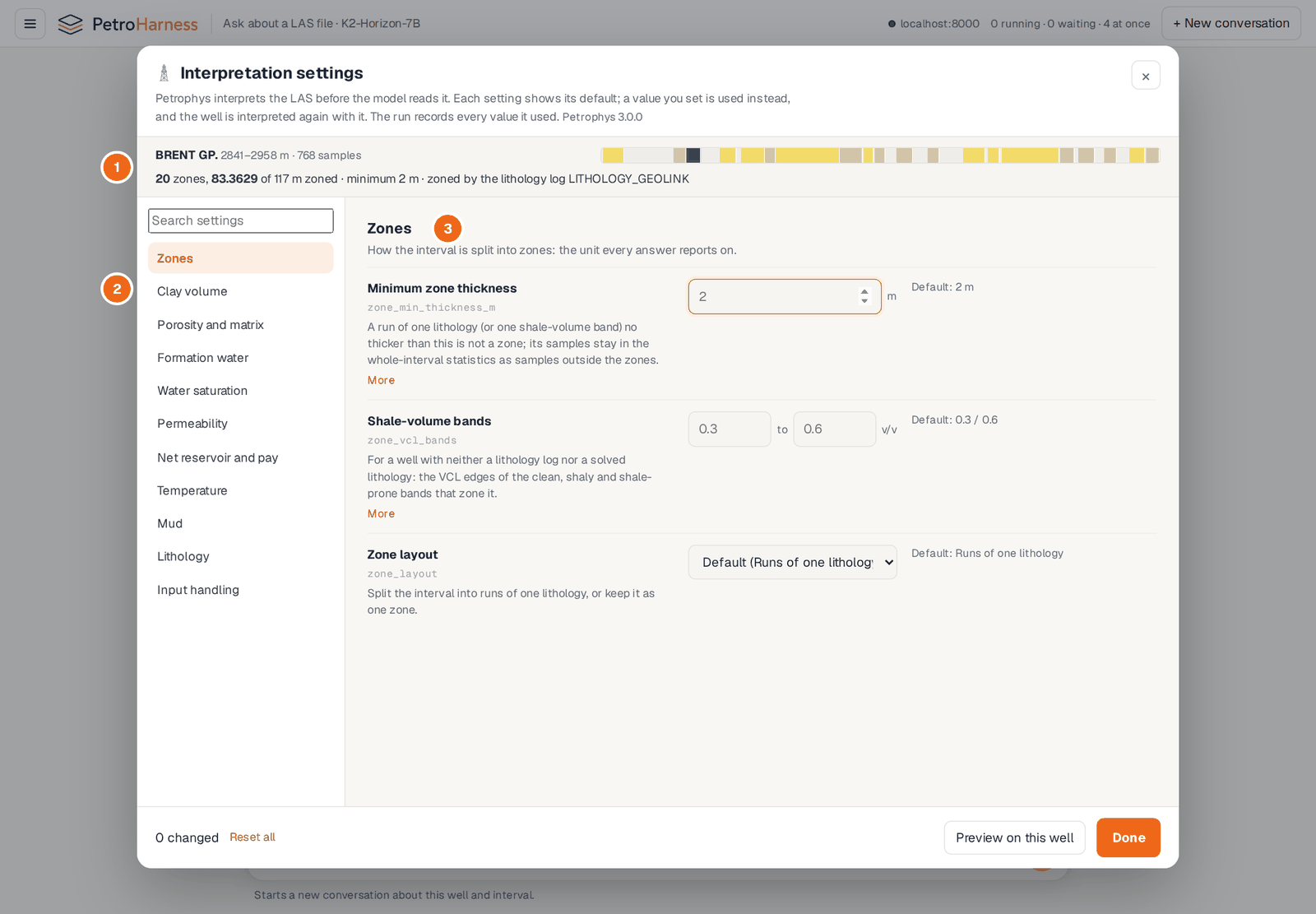
- 65 settings: 62 of Petrophys in 10 groups, read from the installed library, and 3 of the harness's zone rule.
- Unset is the default: the policy's for the zone rule and the net-pay cutoffs (
vcl_cutoff0.3,sw_cutoff0.7,phie_cutoff0.08), Petrophys's for the rest, often decided from the well itself ("from the data" below). - A Petrophys setting interprets the well again (another cache entry); a zone setting re-zones the interpreted well. The record keeps the value Petrophys applied for each setting.
- Checked before anything runs:
settings.validate, then Petrophys's ownDynamicWorkflowConfig. Petrophys settings are refused with a context profile (--profile) or a data interpreter.
Set them by name, the same way everywhere:
import petrophys
from petroharness.ask import ask

r = ask(petrophys.sample("30/6-5"), "Which zone has the best reservoir quality?",
        tops=petrophys.sample("formations_30_6-5.csv"), formation="BRENT GP.",
        interpretation={"sw_model": "indonesia", "m": 2.2})
What a setting does on GeoLink 30/6-5, Brent Group (2841-2958 m), read back from Petrophys's step record
(settings.used) and the zoning (real runs). Data: GeoLink, CC BY-SA 4.0. A carbonate interval beside it:
section 4.
| Given | Petrophys applied (step) | Zones |
|---|---|---|
| nothing | sw_model archie+simandoux, m 2.0, n 2.0 (saturation); gr_min 20.0, gr_max 115.313 (vclay); matrix_type sandstone, phi_cl 0.2307 (porosity); vcl_cutoff 0.3, sw_cutoff 0.7, phie_cutoff lithology_dependent (net_pay) |
20, covering 83.4 of 117.0 m |
sw_, m: 2.2 |
sw_model indonesia, m 2.2 (saturation) |
20 |
gr_min: 30, gr_max: 120 |
gr_min 30.0, gr_max 120.0 (vclay) |
20 |
sw_cutoff: 0.6, phie_cutoff: 0.1 |
sw_cutoff 0.6, phie_cutoff 0.1 (net_pay); the view's policy cutoffs follow |
20 |
zone_ |
(the zone rule: no reinterpretation) | 31, covering 98.9 m |
zone_ |
(the zone rule) | 1, the whole interval |
The summary, with where each part is defined
| Item | Value | Where |
|---|---|---|
| Settings | 65: 62 of Petrophys in 10 groups, and 3 of the harness's zone rule | well. |
| Petrophys's source | petrophys.: its fields, the comments in its source, its own validation |
well.settings |
| Defaults | Petrophys's field defaults; the policy's for vcl_cutoff (0.3), sw_cutoff (0.7), phie_cutoff (0.08, the clastic cutoff) and the zone rule (2.0 m, [0.3, 0.6], lithology_runs); none shown where Petrophys decides from the well |
well., resources/ |
| Ways to set | ask(..., interpretation=), Conversation., the web UI's settings panel, /set in petroharness chat, Conversation.adopt, a field notes file; a settings file's data.interpret and data.zone_* |
section 8 |
| Checks | settings.validate (kind, choice, range), then Petrophys's DynamicWorkflowConfig |
well. |
| Effect | a Petrophys setting re-interprets the well (another cache entry); a zone setting re-zones the same interpreted well | prepare., FormationView. |
| Refused with | a context profile (--profile) or a data interpreter, for Petrophys settings |
interval. |
| Field notes | name, settings, notes; at most 20 notes of 300 characters |
well.notes |
2. How it works
A setting is checked, split between Petrophys and the zone rule, and applied: Petrophys's options go to
petrophys., the zone rule to the zoning of the interpreted well.
flowchart TD
    S["settings.schema<br/>DynamicWorkflowConfig + policy"] --> P["settings panel, /set,<br/>interpretation=, field notes"]
    P --> V{"settings.validate"}
    V -- "problems" --> E["ValueError / InputError<br/>each setting with what is wrong"]
    V -- ok --> X["settings.split"]
    X -- "Petrophys's" --> I["data.interpret<br/>over the policy's cutoffs"]
    X -- "zone rule" --> Z["data.zone_min_thickness_m<br/>data.zone_vcl_bands, data.zone_layout"]
    I --> C["view.user_cutoffs<br/>policy cutoffs follow"]
    C --> W["prepare_well<br/>petrophys.interpret(las, **options)"]
    Z --> F["FormationView.build<br/>zones"]
    W --> F
    W --> U["settings.used<br/>values Petrophys took"]
The eight steps, in code
- The sheet.
settings.schema()builds the list of settings once per process: Petrophys's fields with their help, choices, defaults and units, grouped bysettings.GROUPS, and the harness's zone rule (ZONE_FIELDS). - The values. A user gives settings by name: in Python, in the web UI, with
/set, or in a field notes file. Field notes' settings sit under any given at the start (ask.ask,Conversation.start). - The check.
settings.validatechecks each value's kind and range and passes Petrophys's settings throughDynamicWorkflowConfig; any problem stops the run before Petrophys interprets. - The split.
settings.splitseparates Petrophys's options from the zone rule.interval.puts Petrophys's over_ interpretation data.interpret(over the policy's cutoffs) and the zone rule intodata.zone_*. - The policy.
view.user_cutoffsmakes the policy's cutoffs followvcl_cutoff,sw_cutoffandphie_cutoff, so the cutoff check and the record quote the cutoffs Petrophys used. - The interpretation.
prepare.callsprepare_ well petrophys.; the options are part of the cache key, so a changed setting interprets the well again.interpret(las, **data. interpret) - The zones.
FormationView.appliesbuild zone_,min_ thickness_ m zone_vcl_bandsandzone_layout. - The read-back.
settings.reads from the step record the value Petrophys applied for each setting on this well, with the unit the step records beside it; the web UI's preview shows it.used(prep)
3. The settings sheet
settings.schema() gives the settings grouped for the page, each described by Petrophys's own field and
documentation; GET /api/settings serves it. Each setting carries its key, label, kind, unit, choices,
default, help (Petrophys's first sentence) and more (the whole documentation).
settings.schema()
| Name | Type | Default | Meaning | Defined in |
|---|---|---|---|---|
groups |
list | {key, title, about, fields} in GROUPS order, then more ("More from Petrophys") when a field is in no group |
settings.schema |
|
petrophys |
text | the installed Petrophys's identity (prepare.) |
settings._library |
|
key |
text | the setting's name, as interpretation= and /set take it |
settings.schema |
|
label |
text | LABELS, else the name with spaces |
the panel's label | settings.LABELS |
kind |
text | switch (bool), choice (text with choices), integer, number, bands, text |
settings.schema |
|
unit |
text | "" |
for a number: the first of UNITS its documentation's first sentence names, else the first named in the rest; "" for a switch or a choice |
settings._unit |
choices |
list | [] |
the values Petrophys accepts, read from its validation message (use one of: ...) |
settings._choices |
default |
value | the field's default; the policy's for vcl_cutoff (vcl_max), sw_cutoff (sw_max), phie_cutoff (phie_min_clastic) and the zone rule; None where Petrophys decides from the well |
settings.schema |
|
help |
text | the documentation's first sentence | settings._first |
|
more |
text | the whole documentation | settings._plain |
|
common |
yes/no | shown first in its group (COMMON) |
settings.COMMON |
|
petrophys |
yes/no | a Petrophys setting (false for the zone rule) |
settings.schema |
|
heading |
text | the group heading in Petrophys's source (# -- Heading --) |
settings. |
|
choice_labels |
table | zone_layout only: the panel's words for each choice (Runs of one lithology, The whole interval as one zone) |
settings. |
|
length |
yes/no | zone_ only, true; nothing reads it |
settings. |
Example: two fields as the sheet gives them (real output).
{"key": "gr_min", "label": "GR clean (gr_min)", "kind": "number", "unit": "API", "choices": [], "default": null,
 "help": "Clean-rock gamma-ray endpoint, API, used as given.",
 "more": "Clean-rock gamma-ray endpoint, API, used as given. None picks P5 of the log, lowered to 20 API when higher (a guard against a nearly flat GR, reported in the trace as gr_min_used, with a warning when the pick is above 30 API).",
 "common": true, "petrophys": true, "heading": "Gamma-ray clay volume"}
{"key": "zone_vcl_bands", "label": "Shale-volume bands", "kind": "bands", "unit": "v/v", "choices": [],
 "default": [0.3, 0.6],
 "help": "For a well with neither a lithology log nor a solved lithology: the VCL edges of the clean, shaly and shale-prone bands that zone it.",
 "more": "Below the first edge a sample is clean, between the edges shaly, above the second shale-prone.",
 "common": true, "petrophys": false, "heading": "Zones"}
Notes:
- The sheet is read from the installed Petrophys, so a setting added to the library appears with no change here,
under "More from Petrophys" until a group names it. With the pinned Petrophys (
3.0.0) every field is grouped or hidden. schema()is cached (functools.); a running process does not see a Petrophys upgrade.lru_ cache
Module constants
The tables in well/settings.py that shape the sheet.
| Name | Type | Default | Meaning | Defined in |
|---|---|---|---|---|
GROUPS |
list | 11 groups | (key, title, about, Petrophys fields): zones, clay, porosity, water, saturation, permeability, pay, temperature, mud, lithology, input |
settings.GROUPS |
HIDDEN |
set | raise_on_error, peer_wells, formation_tops, zones, lithology, lithology_csv, lithology_, lithology_codes, lithology_curve, skip_steps, nd_clay, curve_aliases: fields that take a table, a list of wells or a file, and internal flags. Besides these, every setting whose type takes a table, a list or a pair (mineral_endpoints, bad_hole, perm_coefficients, ...) is not a field; a settings file gives it under data.interpret |
settings.HIDDEN, settings. |
|
COMMON |
set | zone_, zone_vcl_bands, zone_layout, gr_method, gr_min, gr_max, matrix_type, rho_ma, rw, salinity_ppm, sw_model, a, m, n, perm_method, vcl_cutoff, phie_cutoff, sw_cutoff, bht, mud_type, lithology_domain |
settings.COMMON |
|
LABELS |
table | setting -> the panel's label | settings.LABELS |
|
UNITS |
list | (token, shown): degF/100ft °F/100 ft, degF °F, ohm.m, g/cm3 g/cm³, us/ft µs/ft, ppm, mg/l, v/v, in feet ft, API, mV, meq/100g and meq/100 g meq/100 g |
settings.UNITS |
|
ZONE_FIELDS |
list | the harness's three zone settings | settings. |
Example: reading the sheet in Python.
from petroharness.well import settings as T

for group in T.schema()["groups"]:
    print(group["title"], [f["key"] for f in group["fields"]])
4. Setting reference
Each group below is the sheet as settings.schema() gives it with the pinned Petrophys. "From the data" means the
sheet gives no default: Petrophys reads the value from the LAS header or derives it from the well, and the web UI's
preview shows the value it took. The Meaning column is the sheet's help, Petrophys's own first sentence. The examples
read back what Petrophys applied on GeoLink 30/6-5, Brent Group, at the defaults (settings.used, real output).
The defaults depend on the well. A clastic interval with a lithology log, and a carbonate interval without one, at the
defaults and with lithology_ and matrix_ set (real runs: settings.used and
Petrophys's step records):
| Petrophys used | 30/6-5, Brent Group | HW-3, KHARAIB-2: defaults | HW-3, KHARAIB-2: carbonate set |
|---|---|---|---|
| Zones from | the lithology log LITHOLOGY_GEOLINK: 20 zones |
Petrophys's mineral solver, clastic domain: 8 zones, 7 sandstone and 1 dolomite | Petrophys's mineral solver, carbonate domain: 9 zones, 8 limestone and 1 dolomite |
lithology_domain, matrix_type |
clastic, sandstone | clastic, sandstone | carbonate, limestone |
rho_ma |
per lithology-log group (sandstone 2.65, limestone 2.71, coal 1.35) | 2.65 | 2.71 |
| Lithology step | canonical_ |
canonical_ |
generic_ |
phie_cutoff |
lithology_: 0.08 for 20,393 clastic samples, 0.045 for 1,783 carbonate ones (whole well) |
0.08 (431 clastic samples) | 0.045 (431 carbonate samples) |
sw_model (auto) |
archie+simandoux | archie (431 samples) | archie (431 samples) |
a, m, n |
lithology_dependent, 2.0, 2.0 | 1.0, 2.03, 2.0 | 1.0, 2.03, 2.0 |
| NET_PAY in the interval | 185 samples (28.18 m) | 380 samples (190 ft) | 388 samples (194 ft) |
Data: GeoLink, CC BY-SA 4.0 (30/6-5); Costa Gomes, Geiger and Arnold (2022), COSTA model, Heriot-Watt University, CC BY (HW-3).
Zones (zones)
How the interval is split into zones: the unit every answer reports on. These three are the harness's own (section 5). Shown first: all three.
| Name | Type | Default | Meaning | Choices | Unit | Label |
|---|---|---|---|---|---|---|
zone_ |
number | 2.0 |
A run of one lithology (or one shale-volume band) no thicker than this is not a zone; its samples stay in the whole-interval statistics as samples outside the zones. | - | m | Minimum zone thickness |
zone_vcl_bands |
bands | [0.3, 0.6] |
For a well with neither a lithology log nor a solved lithology: the VCL edges of the clean, shaly and shale-prone bands that zone it. | - | v/v | Shale-volume bands |
zone_layout |
choice | lithology_runs |
Split the interval into runs of one lithology, or keep it as one zone. | lithology_runs, formation |
- | Zone layout |
Example: a finer zone rule for a thin-bedded interval.
interpretation = {"zone_min_thickness_m": 1.0}
Notes:
- On 30/6-5, Brent Group (a lithology log), the default rule gives 20 zones covering 83.4 m of the 117.0 m interval;
a 1.0 m minimum gives 31 (98.9 m), a 3.0 m minimum 11 (61.0 m), and
zone_one zone (real runs).layout: formation - The bands zone only a well with neither a lithology log nor a solved lithology. Taranaki
tuhua-7has a solved lithology, so the bands leave its zones as they are: its McKee Formation has 11 zones at the default edges and at[0.25, 0.5](real runs). Called directly on that formation's VCL (formation., thenvcl_ band_ labels formation.), the bands give 6 zones at the default edges and 8 atsegment_ zones [0.25, 0.5]. Data: Taranaki Basin Curated Well Logs Dataset (New Zealand Petroleum & Minerals), CDLA-Sharing-1.0. - A run exactly as thick as the minimum is dropped too: a zone needs base minus top strictly above it
(
formation.).segment_ zones
Clay volume (clay)
How shale volume (VCL) is computed from the gamma ray, SP and density-neutron. Shown first: gr_method, gr_min,
gr_max.
| Name | Type | Default | Meaning | Choices | Unit | Label |
|---|---|---|---|---|---|---|
gr_method |
choice | linear |
Transform: "linear", "larionov_tertiary", "larionov_older", "stieber" (stored as "steiber") or "clavier". | linear, larionov_tertiary, larionov_older, steiber, clavier |
- | GR to shale volume |
gr_min |
number | from the data | Clean-rock gamma-ray endpoint, API, used as given. | - | API | GR clean (gr_min) |
gr_max |
number | from the data | Shale gamma-ray endpoint, API, used as given. | - | API | GR shale (gr_max) |
sp_min |
number | from the data | Shale SP baseline, mV: the line of least SP deflection. | - | mV | SP shale (sp_min) |
sp_max |
number | from the data | Clean-sand SP line (static SP), mV: the line of greatest deflection. | - | mV | SP clean (sp_max) |
rho_cl |
number | from the data | Clay density, g/cm3, used by the carbonate mineral solve and the neutron-density hydrocarbon correction. | - | g/cm³ | Clay density |
Example: the values Petrophys took on 30/6-5, Brent Group.
{"gr_method": {"value": "linear", "step": "vclay"}, "gr_min": {"value": 20.0, "step": "vclay"},
 "gr_max": {"value": 115.313, "step": "vclay"}, "sp_min": {"value": 111.60919399999966, "step": "vclay"},
 "sp_max": {"value": 43.167896, "step": "vclay"}}
Notes:
- Unset,
gr_minis P5 of the log (lowered to 20 API when higher) andgr_maxP95 (raised to 100 API when lower), as Petrophys's help says. On 30/6-5 the vclay record showsgr_min21.635344 andgr_min_used20.0: VCL used 20 API, andsettings.usedand the preview report 20, the value applied. - Unset,
sp_min(the shale baseline) is P95 of the SP log andsp_max(the clean-sand line) P5; on 30/6-5 the vclay record shows both picked automatically (sp_min_sourceandsp_max_sourceauto), and the SP not in the VCL (sp_in_vclfalse). Petrophys's help: VCL_SP joins the minimum-of-indicators VCL only when both are set. - The shale-volume bands, and so the zones of a well with neither a lithology log nor a solved lithology, follow VCL:
setting
gr_minandgr_maxmoves them. The mineral solver reads VCL too: it is among the lithology step's inputs.
Porosity and matrix (porosity)
The matrix and fluid properties the porosity equations use. Shown first: matrix_type, rho_ma.
| Name | Type | Default | Meaning | Choices | Unit | Label |
|---|---|---|---|---|---|---|
matrix_type |
choice | from the data | "auto" (resolved from lithology evidence) or a mineral name such as "sandstone", "limestone" or "dolomite"; see petrophys.model.constants.MatrixProperties.names. | auto, anhydrite, calcite, calcium_carbonate, carnallite, coal, dolo, dolomite, gypsum, halite, kainite, lime, limestone, ls, polyhalite, quartz, salt, sand, sandstone, shale, silica, sio2, ss, sylvite |
- | Matrix |
rho_ma |
number | from the data | Matrix density, g/cm3. | - | g/cm³ | Matrix density (ρma) |
nphi_ma |
number | from the data | Matrix neutron porosity, v/v. | - | v/v | Matrix neutron porosity |
dt_ma |
number | from the data | Matrix sonic slowness, us/ft. | - | µs/ft | Matrix sonic (Δtma) |
rho_fl |
number | from the data | Pore-fluid density, g/cm3, used by the porosity, hydrocarbon-correction and mineral steps alike. | - | g/cm³ | Fluid density (ρfl) |
dt_fl |
number | 189.0 |
Pore-fluid sonic slowness, us/ft. | - | µs/ft | Fluid sonic (Δtfl) |
phi_cl |
number | from the data | Clay (shale) porosity, v/v. | - | v/v | Clay porosity |
apply_ |
switch | false |
Apply the neutron-density hydrocarbon correction (opt-in). | - | - | Hydrocarbon correction |
hc_type |
choice | oil |
Hydrocarbon type, "oil" or "gas": the fluid of the neutron-density hydrocarbon correction and, under "current", the PHIT rule in neutron-density crossover (PHID > PHIN + 0.05): the root-mean-square of PHID and PHIN (Gaymard and Poupon, 1968) for gas, density porosity for oil. | oil, gas |
- | Hydrocarbon type |
rho_hc |
number | from the data | Hydrocarbon density in the flushed zone, g/cm3, for the hydrocarbon correction and the core matrix-density check of auto lithology. | - | g/cm³ | Hydrocarbon density (ρhc) |
hc_hydrogen_index |
number | from the data | Hydrogen index of the hydrocarbon for the neutron hydrocarbon correction. | - | - | Hydrocarbon hydrogen index |
Example: the values Petrophys took on 30/6-5, Brent Group (values only).
{"matrix_type": "sandstone", "rho_fl": 1.0, "dt_fl": 189.0, "phi_cl": 0.2307010080670183}
Notes:
- Unset,
rho_mais the value formatrix_type, or per depth that of each lithology-log group; set, it holds at every depth (Petrophys's help). On 30/6-5 the porosity step takes the matrix per depth from the lithology log (matrix_sourcevendor_: sandstone 2.65 g/cm³, limestone 2.71, coal 1.35), solithology_ log[LITHOLOGY_ GEOLINK] rho_ma,nphi_maanddt_mahave no single value to read back. - Without a lithology log, one matrix holds at every depth: on COSTA HW-3, KHARAIB-2,
rho_ma2.65 at the defaults (sandstone) and 2.71 withmatrix_(Data: Costa Gomes, Geiger and Arnold (2022), COSTA model, Heriot-Watt University, CC BY).type: limestone - Unset,
phi_clis derived from the well's shale samples where they support it, with 0.15 as the last resort.
Formation water (water)
Rw: given, from salinity, or estimated from the data. Shown first: rw, salinity_ppm.
| Name | Type | Default | Meaning | Choices | Unit | Label |
|---|---|---|---|---|---|---|
rw |
number | from the data | Formation water resistivity Rw, ohm.m, at rw_meas_temp. | - | ohm.m | Rw |
salinity_ppm |
number | from the data | Formation water salinity, ppm NaCl equivalent: another way to give the formation water. | - | ppm | Water salinity |
rw_meas_temp |
quantity | from the data | Temperature of rw, e.g. "230 degF" or "110 degC". | - | °F | Rw temperature |
allow_default_rw |
switch | true |
Use a 0.05 ohm.m default Rw when no Rw source is found (the warnings say so). | - | - | Default Rw if none found |
Example: Rw given with its temperature.
interpretation = {"rw": 0.05, "rw_meas_temp": "150 degF"}
Notes:
- Without
rw_meas_temp, Rw is taken at the median formation temperature (no temperature correction). - A temperature, gradient or depth is given with its unit (
"65 degC","30 degC/,km" "2650 m"); a bare number is read in the unit the panel shows (°F, °F/100 ft; a depth in the well's own unit), with Petrophys's warning. salinity_ppmmakes Rw follow the temperature profile ahead of a header RW; a setrwwins over it.- With
allow_, saturation is not computed without an Rw source.default_ rw: false - On 30/6-5 no water setting is recorded under its own name: the rw step took the LAS header's RW
(
las_; "Rw corrected from LAS metadata: 0.0700 ohm.m @ 230F along the temperature profile").metadata_ temperature_ profile_ corrected
Water saturation (saturation)
The saturation model and its parameters. Shown first: sw_model, a, m, n.
| Name | Type | Default | Meaning | Choices | Unit | Label |
|---|---|---|---|---|---|---|
sw_model |
choice | auto |
"auto" (routed per sample by clay content) or one of "archie", "simandoux" (Sw in the clay term, Bardon-Pied), "modified_simandoux" (sand term over 1 - Vcl), "indonesia", "dual_water", "waxman_smits", "north_sea", "nigeria_schlumberger". | auto, archie, north_sea, nigeria_, simandoux, modified_simandoux, indonesia, dual_water, waxman_smits |
- | Saturation model |
a |
number | from the data | Tortuosity factor a. | - | - | Tortuosity a |
m |
number | from the data | Cementation exponent m; one value, or one per lithology as for a. | - | - | Cementation m |
n |
number | from the data | Saturation exponent n; one value, or one per lithology as for a. | - | - | Saturation exponent n |
m_star |
number | 2.0 |
Waxman-Smits cementation exponent m*. | - | - | Shaly-sand m* |
cec |
number | from the data | Cation exchange capacity, meq/100 g (0 to 150; pure smectite is 80-150). | - | meq/100 g | CEC |
b_coeff |
number | from the data | Equivalent counter-ion conductance B, (S/m)/(meq/cm3): at 25 degC 4.6 * (1 - 0.6 * exp(-0.77 / Rw)) (Waxman and Smits, 1968), and higher at reservoir temperature. | - | - | B coefficient |
rwb |
number | from the data | Bound-water resistivity, ohm.m, from lab data or the LAS header. | - | ohm.m | Bound-water Rwb |
rtsh |
number | from the data | Shale resistivity Rsh, ohm.m, of the shaly-sand equations (Simandoux, modified Simandoux, Indonesia, North Sea, Nigeria). | - | ohm.m | Shale Rt |
vsh_exp |
number | 1.6 |
Shale exponent of the North Sea model. | - | - | Shale-volume exponent |
shale_exp |
number | 1.6 |
Shale exponent of the Nigeria-Schlumberger model. | - | - | Shale exponent |
sw_ |
number | from the data | Clay volume, v/v, from which sw_model="auto" uses a shaly-sand equation rather than Archie. | - | v/v | Shaly-sand model above VCL |
Example: the values Petrophys took on 30/6-5, Brent Group (values only), and a change.
{"sw_model": "archie+simandoux", "a": "lithology_dependent", "m": 2.0, "n": 2.0, "m_star": 2.0,
 "rtsh": 2.9059999999999997, "vsh_exp": 1.6, "shale_exp": 1.6}
interpretation = {"sw_model": "indonesia", "m": 2.2, "rw": 0.05}
Notes:
sw_model: autoroutes each sample by clay volume:archie+simandouxabove is the record of such a run, not a value the setting accepts.areadslithology_where Petrophys took one value per lithology.dependent - Petrophys takes
a,mandnas one value or one per lithology ({"sandstone": 0.); the sheet takes one number (a table is refused with81, "carbonate": 1. 0} give a number), so a per-lithology table goes in a settings file'sdata.interpret. - Unset,
sw_usesrouting_ vcl_ cutoff vcl_cutoff, or 0.3 when that is unset. - Waxman-Smits runs only with
cecandb_coeff, from lab data or the LAS header; neither is estimated. - Dual Water runs only with
rwb, which is not estimated; the saturation record says what took its place. On 30/6-5: "Dual Water needs a supplied Rwb, which is not estimated: 1468 shaly carbonate samples used the Simandoux equation (set rwb to use Dual Water)"; on GeoLink 16/7-1 (whole well), 839 samples used the Indonesia equation. - What
autochose on the sample wells: archie+simandoux on 30/6-5, Brent Group; archie on all 431 samples of COSTA HW-3, KHARAIB-2; simandoux+archie on KGS 1046123714, Lansing-Kansas City; indonesia+archie on 16/7-1 and on Teapot 17-WX-21 (whole wells). Data: GeoLink, CC BY-SA 4.0; Costa Gomes, Geiger and Arnold (2022), COSTA model, Heriot-Watt University, CC BY; Kansas Geological Survey (kgs.ku.edu); Teapot Dome (NPR-3), RMOTC, U.S. Department of Energy.
Permeability (permeability)
The permeability transform and the irreducible water saturation. Shown first: perm_method.
| Name | Type | Default | Meaning | Choices | Unit | Label |
|---|---|---|---|---|---|---|
perm_method |
choice | auto |
Permeability method. | auto, timur, coates, wyllie_rose, lith_vcl |
- | Permeability transform |
perm_ |
choice | coates |
Empirical equation of PERM under perm_method="auto": "coates" (default), "timur", "wyllie_rose" or "lith_vcl". | timur, coates, wyllie_rose, lith_vcl |
- | Fallback transform |
swirr |
number | from the data | Irreducible water saturation, v/v, for the permeability equations. | - | v/v | Irreducible Sw |
swirr_flag_phi_cl |
choice | workflow |
Clay porosity behind the PHIE that picks the SWIRR_APP samples, i.e. the reservoir flag built before permeability when the well has no RESFLAG or NET_RES curve. | workflow, all_shale_phit |
- | Swirr reservoir flag |
use_peer_core |
switch | false |
Calibrate permeability with core data from peer_wells, under the conditions given there; without peer_wells it has no effect. | - | - | Use core from peer wells |
Example: a change, and what Petrophys read back on 30/6-5, Brent Group.
interpretation = {"perm_method": "timur", "swirr": 0.25}
{"swirr": {"value": 0.25, "step": "permeability"}}
Notes:
- At the defaults, 30/6-5 records no
swirrunder its own name: the permeability step estimates it (swirr_sourcebuckles_bvw_irr) and, withperm_method: auto, fits a core model from the well's own core (strategysame_).well_ core+coates perm_methodis recorded as the step'smethod, so it is not read back. use_peer_corereads core data frompeer_wells, which the sheet hides; the panel cannot set the wells.
Net reservoir and pay (pay)
The cutoffs that flag net reservoir and net pay. Shown first: vcl_cutoff, phie_cutoff, sw_cutoff.
| Name | Type | Default | Meaning | Choices | Unit | Label |
|---|---|---|---|---|---|---|
vcl_cutoff |
number | 0.3 |
Maximum clay volume for net rock, v/v. | - | v/v | VCL cutoff |
phie_cutoff |
number | 0.08 |
Minimum effective porosity for net reservoir, v/v. | - | v/v | PHIE cutoff |
sw_cutoff |
number | 0.7 |
Maximum water saturation for net pay, v/v. | - | v/v | SW cutoff |
reuse_ |
switch | false |
Reuse a RESFLAG or NET_RES curve already on the well as the reservoir flag that picks the SWIRR_APP samples before permeability. | - | - | Reuse the LAS reservoir flag |
Example: the cutoffs Petrophys used on 30/6-5, Brent Group, at the defaults, and with a change.
{"vcl_cutoff": {"value": 0.3, "step": "net_pay"}, "phie_cutoff": {"value": "lithology_dependent", "step": "net_pay"},
 "sw_cutoff": {"value": 0.7, "step": "net_pay"}}
interpretation = {"sw_cutoff": 0.6, "phie_cutoff": 0.1} # read back: sw_cutoff 0.6, phie_cutoff 0.1 (net_pay)
Notes:
vcl_cutoffandsw_cutoffdefault to the policy's 0.30 and 0.70, whichpetroharnesspasses to Petrophys (interval.). Unset,POLICY_ CUTOFFS phie_cutoffis Petrophys's lithology-family standard: 0.08 clastic, 0.045 carbonate, the policy's values too.- With a lithology log, Petrophys applies that standard per depth: on 30/6-5 the net-pay step records
phie_cutoffaslithology_, with 0.08 for 20,393 clastic samples and 0.045 for 1,783 carbonate ones of the whole well (dependent cutoffs_by_family). Without one, the domain decides for the whole interval: COSTA HW-3, KHARAIB-2 takes 0.08 at the defaults (clastic) and 0.045 withlithology_(the table at the top of section 4).domain: carbonate - The sheet shows the policy's clastic cutoff (
phie_min_clastic, 0.08) as the default ofphie_cutoff; a carbonate domain withphie_cutoffunset takes 0.045. - Every cutoff you set also becomes the policy's for the view (section 6).
Temperature (temperature)
The temperature profile Rw and Rmf are corrected along. Shown first: bht.
| Name | Type | Default | Meaning | Choices | Unit | Label |
|---|---|---|---|---|---|---|
bht |
quantity | from the data | Bottom-hole temperature, e.g. "230 degF" or "110 degC". | - | °F | Bottom-hole temperature |
surface_temp |
quantity | 68.0 |
Surface (mean annual) temperature at depth 0 of the linear temperature profile (offshore, the sea surface rather than the seabed); default 68 degF. | - | °F | Surface temperature |
td |
quantity | from the data | Total depth of the BHT, e.g. "2650 m" or "8700 ft"; a bare number is in the well's depth unit. | - | - | Total depth for BHT |
temperature_ |
quantity | from the data | Geothermal gradient from surface_temp at depth 0, e.g. "30 degC/km", "3 degC/100m" or "1.65 degF/100ft"; a bare number is read as degF/100 ft, with a warning. | - | °F/100 ft | Geothermal gradient |
Example: the values Petrophys took on 30/6-5, Brent Group.
{"surface_temp": {"value": 68.0, "step": "temperature", "unit": "°F"}, "bht": {"value": 258.8, "step": "temperature", "unit": "°F"},
 "td": {"value": 3556.08032, "step": "temperature", "unit": "m"},
 "temperature_gradient": {"value": 1.6353916325489521, "step": "temperature", "unit": "°F/100 ft"}}
Notes:
- Unset,
bhtis the LAS header BHT (on 30/6-5 the header givesBHT126 and the step recordsbht_f258.8, in degF) andtdthe header TD, else the deepest sample. - Petrophys records a setting given with a unit under the name it computes it in (
bht_fforbht, in degF;gradient_forf_ per_ 100ft temperature_), read from its settings class (gradient settings.), and the total depth ascomputed_ names tdwithtd_unitbeside it.settings.usedreads them back under the setting's name, with that unit, and the preview shows the value in it. - A set
bhtmakes the temperature profile follow it rather than an input TEMP log (kept as TEMP_LOG).
Mud (mud)
Mud type and filtrate properties (Rmf, Rm). Shown first: mud_type.
| Name | Type | Default | Meaning | Choices | Unit | Label |
|---|---|---|---|---|---|---|
mud_type |
choice | WBM |
"WBM" (water-based) or "OBM" (oil-based) mud. | WBM, OBM |
- | Mud type |
mud_water |
choice | fresh |
"fresh" or "salt" mud, which sets the Rm-to-Rmf factor. | fresh, salt |
- | Mud water |
mud_ |
switch | false |
The mud contains clay or KCl, so the SP log is not used: Rw is not estimated from the SP, and no VCL_SP is computed. | - | - | Mud has clay or KCl |
rmf_at_meas_temp |
number | from the data | Mud-filtrate resistivity Rmf at rmf_meas_temp, ohm.m. | - | ohm.m | Rmf |
rmf_meas_temp |
quantity | from the data | Temperature at which rmf_at_meas_temp was measured, e.g. "75 degF" or "24 degC". | - | °F | Rmf temperature |
rmf_salinity_ppm |
number | from the data | Mud-filtrate salinity, ppm NaCl equivalent (alternative to Rmf). | - | ppm | Filtrate salinity |
rmf_chlorides_mg_l |
number | from the data | Mud-filtrate chlorides (Cl-), mg/l, as on the mud report and the LAS header CLFL. | - | mg/l | Filtrate chlorides |
rm |
number | from the data | Mud resistivity Rm at rm_meas_temp, ohm.m (Rmf is derived from it). | - | ohm.m | Rm |
rm_meas_temp |
quantity | from the data | Temperature at which rm was measured, e.g. "75 degF" or "24 degC". | - | °F | Rm temperature |
Example: an oil-based mud.
interpretation = {"mud_type": "OBM"}
Notes:
rmf_chlorides_mg_lis in mg/l. Its documentation names ppm too; the sheet shows mg/l, the unit its first sentence names first (settings._unit).
Lithology (lithology)
The interpretation domain and the mineral solve. Shown first: lithology_domain.
| Name | Type | Default | Meaning | Choices | Unit | Label |
|---|---|---|---|---|---|---|
lithology_domain |
choice | from the data | Broad interpretation domain: "clastic" (the default when unset), "carbonate", "evaporite" or "auto". | auto, clastic, carbonate, evaporite |
- | Interpretation domain |
lithology_source |
choice | auto |
Lithology source. | auto, external, vendor, computed, config |
- | Lithology source |
carbonate_ |
choice | from the data | Calibration of the carbonate-domain mineral solve, which takes calcite and dolomite from bulk density and closure. | generic, costa |
- | Carbonate calibration |
Example: the values Petrophys took on 30/6-5, Brent Group, and a carbonate domain on COSTA HW-3, KHARAIB-2.
{"lithology_domain": {"value": "clastic", "step": "vclay"}}
interpretation = {"lithology_domain": "carbonate", "matrix_type": "limestone"}
# read back on HW-3: lithology_domain carbonate (vclay), matrix_type limestone, rho_ma 2.71 (porosity),
# carbonate_calibration generic (lithology)
Notes:
- With
lithology_anddomain: carbonate phie_cutoffunset, Petrophys takes its carbonate porosity cutoff, 0.045: on HW-3, KHARAIB-2 (no lithology log) the net-pay step recordsphie_cutoff0.045 for all 431 samples and 388 NET_PAY samples (194 ft), against 0.08 and 380 samples (190 ft) at the defaults. The lithology step becomesgeneric_, and its record says "PHIE was computed in the porosity step with rho_ma 2.71 g/cm3, so the calcite-dolomite split is not independent of that matrix choice". The cutoff check compares a single recorded cutoff with the policy's for the domain (section 6). Data: Costa Gomes, Geiger and Arnold (2022), COSTA model, Heriot-Watt University, CC BY.calcite_ dolomite_ density_ closure costa, the secondcarbonate_choice, is the calibration of a Petrophys context package.calibration
Input handling (input)
How the LAS curves are read and checked. No setting is shown first.
| Name | Type | Default | Meaning | Choices | Unit | Label |
|---|---|---|---|---|---|---|
standardize_input |
switch | from the data | Standardize curve aliases and units before interpretation: vendor mnemonics get canonical aliases, units such as kg/m3 or percent porosity are converted and implausible values are screened, with a warning. | - | - | Standardize curves and units |
rename_ |
switch | false |
Rename vendor mnemonics to canonical names instead of adding aliases. | - | - | Rename vendor mnemonics |
calculation_ |
choice | current |
Interpretation configuration. | current, geolink |
- | Calculation profile |
Example: renaming vendor mnemonics instead of aliasing them.
interpretation = {"rename_input_curves": True}
Notes:
- Unset,
standardize_inputis on under thecurrentcalculation profile (Petrophys's help). geolink, the secondcalculation_choice, is a Petrophys context package's configuration; for wells of such a package, a context profile (profile --profile) is the way in, and it refuses Petrophys settings. The analyzers classify with the library'scurrentclass tables (policyanalyzers.); a settings file'sclass_ tables data.names a context package's own set instead (Well preparation).analyzer_ class_ tables - A curve-name mapping is not on the sheet (
curve_aliasesis hidden): give it in a settings file'sdata.interpret(Well preparation).
5. The zone rule
The harness's own settings: they change how the interpreted well is zoned, never how Petrophys interprets it, so changing one re-zones without interpreting the well again. On 30/6-5, Brent Group: 20 zones at the default 2.0 m minimum, 31 at 1.0 m.
Zone settings
| Name | Type | Default | Meaning | Defined in |
|---|---|---|---|---|
zone_ |
number, metres | policy zones., 2.0 |
becomes data.; a run is a zone when base minus top exceeds it, converted to the reporting unit |
settings., FormationView. |
zone_vcl_bands |
two numbers, v/v | policy zones., [0.3, 0.6] |
becomes data.; the band edges, used only when the well has neither a lithology log nor a solved lithology |
settings., formation. |
zone_layout |
lithology_runs or formation |
lithology_runs |
becomes data.zone_layout; runs of one label, or the interval as one zone (formation.) |
settings., config.DataPaths |
Example: the same rule in a settings file.
data:
  zone_min_thickness_m: 1.0
  zone_vcl_bands: [0.25, 0.5]
  zone_layout: lithology_runs
Notes:
- The minimum is in metres whatever the reporting unit: on a feet log, 2.0 m is about 6.56 ft.
- The zone rule is not part of the cache key, so changing it re-zones without interpreting the well again.
- With
zone_the operator's lithology (layout: formation --formation-lithology) labels the one zone where the log has none, instead of being appended to the question. - A context profile accepts the zone rule; only Petrophys settings are refused with it.
6. Cutoffs and the policy
A cutoff you set (vcl_cutoff, sw_cutoff, phie_cutoff) also replaces the policy's for that view, so the cutoff
check and the record quote what Petrophys used.
view.user_cutoffs
| Name | Type | Default | Meaning | Defined in |
|---|---|---|---|---|
vcl_cutoff |
setting | policy vcl_max 0.30 |
replaces cutoffs.vcl_max |
view.user_cutoffs |
sw_cutoff |
setting | policy sw_max 0.70 |
replaces cutoffs.sw_max |
view.user_cutoffs |
phie_cutoff |
setting | policy phie_min_clastic 0.08, phie_min_carbonate 0.045 |
replaces both porosity cutoffs | view.user_cutoffs |
POLICY_CUTOFFS |
table | {vcl_ |
the policy's cutoffs petroharness passes to petrophys., under the user's |
interval. |
| check | rule | tolerance 1e-12 |
net pay's recorded vcl_cutoff, sw_cutoff and phie_cutoff must equal the view's policy; a cutoff recorded as text (per depth by lithology, lithology_) is not compared |
prepare. |
Example: the view's policy cutoffs with phie_cutoff: 0.1 (real output).
{"vcl_max": 0.3, "phie_min_clastic": 0.1, "phie_min_carbonate": 0.1, "sw_max": 0.7}
Notes:
- The check takes the domain from the net-pay parameters (
prepare.:lithology_ domain lithology_domain, elselithologyas Petrophys records it, else clastic) and compares the porosity cutoff with the policy's for that domain:phie_min_carbonatefor a carbonate domain,phie_min_clasticotherwise. - A pinned engine (no
interpretoptions) that records no single porosity cutoff is checked on its curves instead: no NET_RES sample at or below the policy's lowest PHIE cutoff, no net-rock sample above its highest left out of NET_RES (prepare.)._ check_ porosity_ cutoff_ on_ curves - A context profile fixes its own cutoffs; the check then compares them with the packaged policy's.
7. Settings functions
well/settings.py holds what code and the pages use to check (validate), apply (split), read back (used),
change (merged, diff) and describe (describe, values) settings.
Functions of well/settings.py
| Name | Type | Default | Meaning | Defined in |
|---|---|---|---|---|
validate(settings) |
-> table | {setting: what is wrong}; empty when all can be used (section 9) |
settings.validate |
|
split(settings) |
-> two tables | (Petrophys's options, the zone rule); band edges as floats |
settings.split |
|
used(prep) |
-> table | {setting: {value, step}}, with unit where the step records one beside the setting (td_unit beside td) or the setting is recorded under its computed name (bht_f: bht in °F): each setting's value in the first step that records a parameter of that name, the applied <name>_used where the step records one; the cutoffs from net_pay; numbers, text and yes/no only |
settings.used |
|
merged(in_ |
-> table | changes over in_force; a value of None removes the setting (back to its default) |
settings.merged |
|
diff(before, after) |
-> list | [{key, from, to}] for each setting whose value differs (None: the default) |
settings.diff |
|
describe(changes) |
-> text | a change in words, as the log, the prompts and the answer header name it | settings.describe |
|
values(settings) |
-> text | settings as values in words | settings.values |
|
_shown(key, value) |
-> text | None is the default (with the sheet's default in brackets when it has one), yes/no is on/off, a list is joined with /, a float is %g |
settings._shown |
Example: the functions on real inputs (real output).
>>> T.split({"m": 1.8, "zone_min_thickness_m": 1.0, "zone_vcl_bands": [0.25, 0.5], "zone_layout": "formation"})
({'m': 1.8}, {'zone_min_thickness_m': 1.0, 'zone_vcl_bands': [0.25, 0.5], 'zone_layout': 'formation'})
>>> after = T.merged({"m": 1.8, "rw": 0.04}, {"m": None, "sw_cutoff": 0.6, "rw": 0.04})
>>> after
{'rw': 0.04, 'sw_cutoff': 0.6}
>>> T.diff({"m": 1.8, "rw": 0.04}, after)
[{'key': 'm', 'from': 1.8, 'to': None}, {'key': 'sw_cutoff', 'from': None, 'to': 0.6}]
>>> T.describe(_)
'm 1.8 -> the default; sw_cutoff the default (0.7) -> 0.6'
>>> T.values({"m": 1.8, "sw_cutoff": 0.6, "zone_vcl_bands": [0.25, 0.5], "apply_hc_correction": True})
'm 1.8; sw_cutoff 0.6; zone_vcl_bands 0.25 / 0.5; apply_hc_correction on'
Notes:
- Where Petrophys records both a computed and an applied value,
usedreports the applied one (gr_min_usedovergr_min, section 4). usedcan report a value the setting does not accept, such assw_modelarchie+simandouxafterauto, orphie_cutofflithology_.dependent
8. Passing settings
Every way in ends in the same interpretation table, {setting: value}, which interval. applies. The
same change, four ways, on 30/6-5 Brent:
ask(petrophys.sample("30/6-5"), "Which zone has the best reservoir quality?", formation="BRENT GP.",
    tops=petrophys.sample("formations_30_6-5.csv"),
    interpretation={"rw": 0.05, "sw_model": "indonesia", "m": 2.2, "zone_min_thickness_m": 1.0})
# settings.yaml, given with --settings
data:
  interpret: {rw: 0.05, sw_model: indonesia, m: 2.2}
  zone_min_thickness_m: 1.0
question> /set rw=0.05 sw_model=indonesia m=2.2 zone_min_thickness_m=1
{"las": "/data/30_6-5.las", "question": "Which zone has the best reservoir quality?",
 "interval": {"mode": "tops", "tops": "/data/formations_30_6-5.csv", "formation": "BRENT GP."},
 "interpretation": {"rw": 0.05, "sw_model": "indonesia", "m": 2.2, "zone_min_thickness_m": 1.0}}
Precedence, highest first: a later change (/set, adopt, the UI's "Use from the next question"); the settings
given at the start; the field notes' settings; a settings file's data.interpret; the policy's cutoffs; Petrophys's
defaults.
Ways in
| Name | Type | Default | Meaning | Defined in |
|---|---|---|---|---|
ask(..., interpretation=) |
Python | None |
one question under these settings | ask.ask |
Conversation. |
Python | None |
a conversation's settings from the start; kept in the log's inputs | session. |
field_notes= / --field-notes |
file | none | the file's settings, under any given at the start | well.notes.load |
| web UI settings panel | JSON | Petrophys defaults | interpretation of POST /api/ask and POST /api/preview |
ui. |
/set name=value |
chat command | Conversation.adopt, from the next question on |
session. |
|
Conversation. |
Python | as /set; None takes a setting back to its default |
Conversation.adopt |
|
settings file data.interpret, data.zone_* |
YAML | none | Petrophys options and the zone rule of every question run with the file; not checked by the sheet | interval._settings |
Notes:
--profilereplacesdata.interpretwith{context_; Petrophys settings are then refused, the zone rule is not.profile: NAME} /setreadsdefaultornoneasNone,true/on/yesandfalse/off/noas yes/no,a,bas a list of numbers, then an integer, a number, else the text (session.).chat. _ value /settingslists the settings in force with(field notes)beside those from the file, and the changes made; it does not list options a settings file puts indata.interpret.
Web UI endpoints
The settings panel's calls (Web UI).
| Name | Type | Default | Meaning | Defined in |
|---|---|---|---|---|
GET /api/settings |
endpoint | settings.schema() |
ui.server |
|
POST /api/preview |
endpoint | the inputs of a question (without the question) and interpretation -> interval, lithology, unit, zones, zoned, interval_thickness, min_thickness, used |
ui.adapter.preview |
|
POST /api/ask |
endpoint | a question with interpretation (and field_notes) |
ui. |
|
follow-up interpretation |
field | the settings to run under from this question on; the job adopts the difference with the settings in force, missing ones back to the default | ui., ui.adapter |
|
GET /api/notes, POST / |
endpoints | a field notes file checked: {path, name, settings, notes} |
ui. |
Example: the preview of 30/6-5, Brent Group, at the defaults (real output; zones and used abridged).
{"interval": {"name": "BRENT GP.", "top": 2841.0, "base": 2958.0, "unit": "m", "samples": 768,
              "from": "tops file formations_30_6-5.csv, base: stated base"},
 "lithology": {"source": "lithology log", "curve": "LITHOLOGY_GEOLINK", "how": "detected"},
 "unit": "m",
 "zones": [{"zone": "Z1", "lithology": "SAND", "top": 2841.3242, "base": 2845.7439}, "... 20 zones"],
 "zoned": 83.3629, "interval_thickness": 117.0, "min_thickness": 2.0,
 "used": {"vcl_cutoff": {"value": 0.3, "step": "net_pay"}, "...": "..."}}
Notes:
- The preview interprets the well into the runs' shared cache, so the question that follows reuses it.
- The preview puts a field notes file's settings under the panel's, as a question does.
9. Validation
settings.validate checks the settings a user gives before anything is interpreted, and names each setting with
what is wrong; Petrophys's own validation follows for its settings. Real messages:
{"m": "abc"}                      -> m: give a number
{"m": true}                       -> m: give a number
{"apply_hc_correction": "yes"}    -> apply_hc_correction: give true or false
{"sw_model": "foo"}               -> sw_model: choose one of: auto, archie, north_sea, nigeria_schlumberger, simandoux, modified_simandoux, indonesia, dual_water, waxman_smits
{"zone_vcl_bands": [0.6, 0.3]}    -> zone_vcl_bands: give two edges between 0 and 1, the first below the second
{"zone_min_thickness_m": 0}       -> zone_min_thickness_m: give a thickness above 0
{"rw": -1}                        -> rw: rw must be greater than 0; got -1.0
{"gr_min": 120, "gr_max": 30}     -> gr_min: gr_min (120) must be less than gr_max (30)
{"bogus": 1}                      -> bogus: not a setting this panel knows
settings.validate
| Check | Applies to | Message | Defined in |
|---|---|---|---|
| known name | every setting | not a setting this panel knows |
settings.validate |
| number | number, integer |
give a number (yes/no is not a number) |
settings.validate |
| whole number | integer |
give a whole number |
settings.validate |
| switch | switch |
give true or false |
settings.validate |
| choice | choice |
choose one of: <choices> |
settings.validate |
| bands | zone_vcl_bands |
give two edges between 0 and 1, the first below the second |
settings.validate |
| thickness | zone_ |
give a thickness above 0 |
settings.validate |
| Petrophys | Petrophys settings together | Petrophys's line for the setting, else the whole message under _petrophys |
DynamicWorkflowConfig |
Notes:
askandConversation.startraiseValueError: WHAT: interpretation settings that cannot be used: rw: rw must be greater than 0; got -1.;0. FIX: correct or remove them. petroharnessexits with status 2.- What Petrophys's configuration accepts is its own: the pinned build accepts
vcl_cutoff: 1.5, for example, and the sheet has no range of its own for a cutoff. - The web UI answers
POST /api/askandPOST /api/previewwith status 400 and{"error": ...}for a refused setting; a preview whose interpretation fails (a Petrophys error, the cutoff check) is a 500 naming the error. - A value the sheet accepts can still stop the interpretation: Petrophys can fail on the well when it runs, or the
cutoff check fails (section 6). Both are
RuntimeErrors, exit status 1.
10. Changing settings in a conversation
Conversation.adopt (or /set in petroharness chat) changes settings from the next question on: the well is
interpreted again, the earlier results stay readable and say they rest on the earlier settings, and the change is
logged. Conversations ("Changing a setting") describes it for users. A real change, made after the
two questions of a 30/6-5 Brent conversation:
chat:    from question 3: m the default -> 1.8 (the well was interpreted again)
header:  - **Settings changed for this question:** m the default -> 1.8
prompt:  Settings changed before question 3 (by the user): m the default -> 1.8. The well was interpreted again with
         them. Results E1 to E18 and the answers before rest on the earlier settings; read again, a result says so.
Conversation.adopt
| Name | Type | Default | Meaning | Defined in |
|---|---|---|---|---|
changes |
table | setting -> new value; None takes it back to its default |
Conversation.adopt |
|
by |
text | user |
who asked, in the log and the prompts | Conversation.adopt |
| returns | list | [{key, from, to}]; [] when the settings asked for are those in force (nothing logged) |
Conversation.adopt |
|
| check | rule | settings.validate on the merged settings; Petrophys settings refused when the conversation has a profile; refused for a conversation on prepared tasks |
Conversation.adopt |
|
_ |
method | stores the settings in inputs["interpretation"], prepares and checks the interval again (interval.prepare, ask.check), and moves the live session to the re-interpreted well (Session.rewell) |
Conversation. |
|
| log | event | settings: the question it takes effect at, changes, by, interpretation (in force after), interval, zones |
Conversation.adopt |
Example: the change above in Python (real output).
c.adopt({"m": 1.8})          # -> [{'key': 'm', 'from': None, 'to': 1.8}]
c.adopt({"m": None})         # -> [{'key': 'm', 'from': 1.8, 'to': None}]   back to the default
c.adopt({})                  # -> []
Notes:
Nonetakes a setting back to Petrophys's or the policy's default, not to the field notes' value.- A later question's answer header lists earlier changes as
Settings changed before question N: ...(ask.); for the change above:_ settings_ lines - **Settings changed before question 3:** m the default -> 1..8
Generations
What a change does to the well, the results and the record.
| Name | Type | Default | Meaning | Defined in |
|---|---|---|---|---|
| next generation | rule | the well interpreted again under the settings in force; every later question reads it | agent. |
|
| ledger | rule | ids go on; every result opened before is marked and the same call asked again is computed anew | agent. |
|
| re-read result | text | [E3] (opened before the settings change before question 2 (m the default -> 1. |
agent. |
|
| trace | block | settings: turn, in_force, sources, changes, changed |
session.graph |
|
| evidence graph | ids | after k changes, curves and steps are curve:<NAME>@gen<k+1>, step:<name>@gen<k+1> (the first generation keeps plain ids) |
evidence.graph |
|
| resume | rule | each settings event is replayed before the question it took effect at, so results reopen on the well as it was then | Conversation. |
Example: the change above in the session log (real; seq, time and the 20 zones left out), and the first result
of question 1 read again after it (abridged).
{"type": "settings", "turn": 3, "changes": [{"key": "m", "from": null, "to": 1.8}], "by": "user",
 "interpretation": {"m": 1.8},
 "interval": {"name": "BRENT GP.", "top": 2841.0, "base": 2958.0, "unit": "m", "samples": 768,
              "from": "tops file formations_30_6-5.csv, base: stated base"}, "zones": ["..."]}
[E1] (opened before the settings change before question 3 (m the default -> 1.8): these values rest on the earlier
settings; stats PHIT, PHIE, PHIE_CC, PHID, PHIN, PHIS, PHI_SEC, VCL, SW, PERM, PERM_CC) Each zone, every curve (its
mean; a flag: the share set; class codes: each class's share):
  Z1: PHIT mean 0.1912; PHIE mean 0.1382; PHIE_CC mean 0.1264; PHID mean 0.1586; PHIN mean 0.24; ...
11. Field notes
A field notes file holds a team's standing choices for a field: settings in force from the start, and notes that go with every question. The settings are checked as the panel checks them; the notes reach the model as the user's statement, and code never acts on their words.
name: Brent Group study
settings:
  m: 1.8
  rw: 0.04
  sw_cutoff: 0.6
  zone_min_thickness_m: 1.0
notes:
  - Report water saturation from the Indonesia model.
  - Name the Ness and Etive formations where a zone falls in one
The file
| Name | Type | Default | Meaning | Defined in |
|---|---|---|---|---|
name |
text | the file's stem | how answers name the notes | notes.load |
settings |
table | {} |
interpretation settings, checked as the panel checks them (settings.validate) |
notes.load |
notes |
list of text, or one text | [] |
standing choices in words; spaces collapsed | notes.load |
KEYS |
constant | ("name", "settings", "notes") |
the only keys allowed | notes.KEYS |
MAX_NOTES |
constant | 20 |
notes at most | notes.MAX_NOTES |
MAX_NOTE_CHARS |
constant | 300 |
characters per note at most | notes. |
notes.load returns for the file above (real output, path left out):
{"sha256": "ccfbff7e41bd83c347b52321bd5f0016f93c997bb4e3d3d50153f262d26397ee", "name": "Brent Group study",
 "settings": {"m": 1.8, "rw": 0.04, "sw_cutoff": 0.6, "zone_min_thickness_m": 1.0},
 "notes": ["Report water saturation from the Indonesia model.",
           "Name the Ness and Etive formations where a zone falls in one"]}
Notes:
- The file must be UTF-8 YAML holding a table; the notes must be non-empty texts.
- Standing values belong under
settings; the notes are words the model reads, not settings.
How field notes are applied
| Name | Type | Default | Meaning | Defined in |
|---|---|---|---|---|
| settings | rule | {**notes.: the notes' settings, under those given at the start |
ask.ask, Conversation.start, ui.adapter.preview |
|
| statement | text | "" without notes |
(The user's field notes for this field, <name>: <notes>), each note ending with a full stop, appended to every question |
notes.statement, interval.task_for |
| sources | table | {setting: "field notes" | "user"}: the notes' when the value is theirs and nobody changed it |
notes.sources, Conversation. |
|
| answer header | line | - **Field notes:** <name> (<settings>); <n> notes with the question |
ask. |
|
| trace and log | record | the trace's ask.field_notes (name, sha256, settings, notes); a conversation's log keeps them in its inputs, so a resume does not read the file again |
ask.ask_record, Conversation.start |
|
| profile | rule | notes with Petrophys settings are refused with a context profile (web UI); with ask, _interpretation refuses them |
ui., interval. |
|
| benchmark | rule | a benchmark run never reads field notes | well.notes |
Example: a conversation on 30/6-5, Brent Group, started with the file above and interpretation={"rw": 0., then
/set sw_cutoff=0.5 (real output).
statement: (The user's field notes for this field, Brent Group study: Report water saturation from the Indonesia model. Name the Ness and Etive formations where a zone falls in one.)
header:    - **Field notes:** Brent Group study (m 1.8; rw 0.04; sw_cutoff 0.6; zone_min_thickness_m 1); 2 notes with the question
at start:  {"m": "field notes", "rw": "user", "sw_cutoff": "field notes", "zone_min_thickness_m": "field notes"}
/set:      from question 1: sw_cutoff 0.6 -> 0.5 (the well was interpreted again)
sources:   {"m": "field notes", "rw": "user", "sw_cutoff": "user", "zone_min_thickness_m": "field notes"}
/settings: settings in force: m=1.8 (field notes), rw=0.05, sw_cutoff=0.5, zone_min_thickness_m=1.0 (field notes)
           changed before question 1: sw_cutoff 0.6 -> 0.5
Notes:
- The notes reach the model as the user's statement, as
--formation-lithologydoes; code never acts on their words. - The header names the settings the file held, not the settings in force after a later change.
12. Limits and errors
Every refusal and error, with where it is raised
| Situation | What happens | Where |
|---|---|---|
| Unknown setting name | ValueError (not a setting this panel knows); UI 400 |
settings.validate |
| Value of the wrong kind, a choice not listed, bad bands, thickness at or below 0 | ValueError naming each setting; UI 400 |
settings.validate |
| Value Petrophys's configuration refuses | ValueError with Petrophys's line |
settings.validate |
Petrophys settings with --profile or data.interpreter |
ValueError: drop one |
interval., Conversation.adopt, ui. |
Unknown option in a settings file's data.interpret |
ValueError: WHAT: data.; exit status 2 |
prepare., prepare. |
Invalid value in a settings file's data.interpret |
Petrophys's ValueError; exit status 2 |
petrophys. |
adopt on a conversation of prepared tasks |
ValueError |
Conversation.adopt |
/set without name=value |
prints the usage line; nothing changes | session. |
/set of the settings in force |
no change: those are the settings in force |
session. |
/set of a value that cannot be used |
not changed: WHAT: interpretation settings that cannot be used: ...; nothing changes |
session. |
| Field notes file missing | FileNotFoundError |
notes.load |
| Field notes not YAML, not a table, or with other keys | ValueError naming the problem and the fix |
notes.load |
| Field notes settings invalid | ValueError: settings in <file> that cannot be used: ... |
notes.load |
| More than 20 notes, or a note over 300 characters | ValueError: ... at most 20 notes of 300 characters each |
notes.load |
13. Related pages
- Well preparation: what the settings feed: the interpretation, the cache, the zones.
- Evaluate a formation: the commands and
ask(..., interpretation=). - Conversations: conversations, changing a setting, field notes.
- Web UI: the settings panel, the preview and the API.
- Audit an answer: how each answer's trail shows the parameters it was made with.
- Development: the data config.
- Configuration: the data config's keys,
data.interpretanddata.zone_*among them. - Web UI API: the settings and preview endpoints in full.
- Command line:
--settings,--field-notesandpetroharness chat.