Custom workflows
pp.interpret chooses the methods from the data (Workflows). When a project needs a fixed recipe, build your own from built-in steps and your own functions.
Check it against a well, run it on one well or a whole folder, and save it to share.
Build a workflow
Add steps in the order they run. Each step states the curves it needs and the curves it adds.
import pandas as pd
import petrophys as pp
from petrophys.workflow import Workflow, WorkflowValidationError, steps, workflow_step

wf = Workflow("Brent Group quick look")
wf.add(steps.clay_volume(method="gr", gr_clean=20, gr_shale=110))
wf.add(steps.porosity(method="density", matrix_density=2.65))
wf.add(steps.formation_water(rw=0.07, rw_meas_temp="230 degF"))   # Rw 0.07 ohm.m at 230 degF
wf.add(steps.saturation(model="archie", a=1, m=2, n=2))
wf.add(steps.net_pay(vcl_cutoff=0.35, phie_cutoff=0.10, sw_cutoff=0.60))
wf.describe()
| Step | Kind | Requires | Produces | Parameters | |
|---|---|---|---|---|---|
| 1 | clay_volume | clay_volume | GR | VCL | method='gr', gr_clean=20, gr_shale=110 |
| 2 | porosity | porosity | RHOB, VCL | PHID, PHIT, PHIE | method='density', matrix_density=2.65 |
| 3 | formation_water | formation_water | - | RW | rw=0.07, rw_meas_temp='230 degF' |
| 4 | saturation | saturation | PHIE, RDEP or RT, RW | SW, SXO | model='archie', a=1, m=2, n=2 |
| 5 | net_pay | net_pay | VCL, PHIE, SW | NET_ROCK, NET_RES, NET_PAY | vcl_cutoff=0.35, phie_cutoff=0.1, sw_cutoff=0.6 |
Parameters are checked when a step is created, so a typo fails at once and names the closest valid option.
try:
    steps.porosity(method="densty")
except ValueError as error:
    print(error)
Invalid steps.porosity() parameters:
  - method='densty' is not valid; use one of: density, neutron_density, neutron, sonic (did you mean 'density'?)
Check a well before running
check lists every input of every step, counting the curves that earlier steps add.
Here the Rw step is left out on purpose.
(pp.interpret warns that this well’s core saturation is stored in percent, and converts it for its core calibration; this page hides that one notice.)
well = pp.read(pp.sample("30_6-5"), formations=pp.sample("formations_30_6-5"))
draft = wf.copy("draft").remove("formation_water")
report = draft.check(well)
report[~report["Met"]]
| Step | Requires | Met | Source | Note | |
|---|---|---|---|---|---|
| 5 | saturation | RW | False | missing | needs RW (formation water resistivity), which is not on this well; add steps.formation_water(rw=..., rw_meas_temp=...) before 'saturation' |
| 8 | net_pay | SW | False | missing | needs SW (water saturation), which step 'saturation' would produce but cannot run |
A run is strict by default: it stops before any calculation and lists every unmet input.
With strict=False it runs the other steps and records why each skipped step could not run.
try:
    draft.run(well)
except WorkflowValidationError as error:
    print(error)
Workflow 'draft' cannot run on well '30/6-5':
  - saturation: needs RW (formation water resistivity), which is not on this well; add steps.formation_water(rw=..., rw_meas_temp=...) before 'saturation'
  - net_pay: needs SW (water saturation), which step 'saturation' would produce but cannot run
Run wf.check(well) for the full table, or pass strict=False to skip these steps and run the rest.
Run and read the trace
run works on a copy of the well. Every step records its method, inputs, outputs, parameters and decisions.
run = wf.run(well)
run
Brent Group quick look on 30/6-5: complete
| Step | Status | Method | Output Curves | Message |
|---|---|---|---|---|
| clay_volume | OK | gr_linear | VCL | |
| porosity | OK | density | PHID, PHIT, PHIE | |
| formation_water | OK | given_rw_arps | RW | |
| saturation | OK | archie | SW, SXO | |
| net_pay | OK | cutoffs | NET_ROCK, NET_RES, NET_PAY, NET_EXCLUSION |
Over the Brent Group window, the net thickness and the statistics of the curves:
brent = run.summary(top=2841, bottom=2958)
brent["net_thickness"]
{'depth_unit': 'm', 'net_rock': 57.15, 'net_res': 52.12, 'net_pay': 20.12}
run.statistics(top=2841, bottom=2958)
| unit | samples | mean | p10 | median | p90 | |
|---|---|---|---|---|---|---|
| VCL | v/v | 768 | 0.443 | 0.115 | 0.361 | 0.912 |
| PHIT | v/v | 768 | 0.159 | 0.037 | 0.182 | 0.246 |
| PHIE | v/v | 768 | 0.109 | 0.000 | 0.116 | 0.218 |
| SW | v/v | 768 | 0.853 | 0.276 | 1.000 | 1.000 |
Plot the result
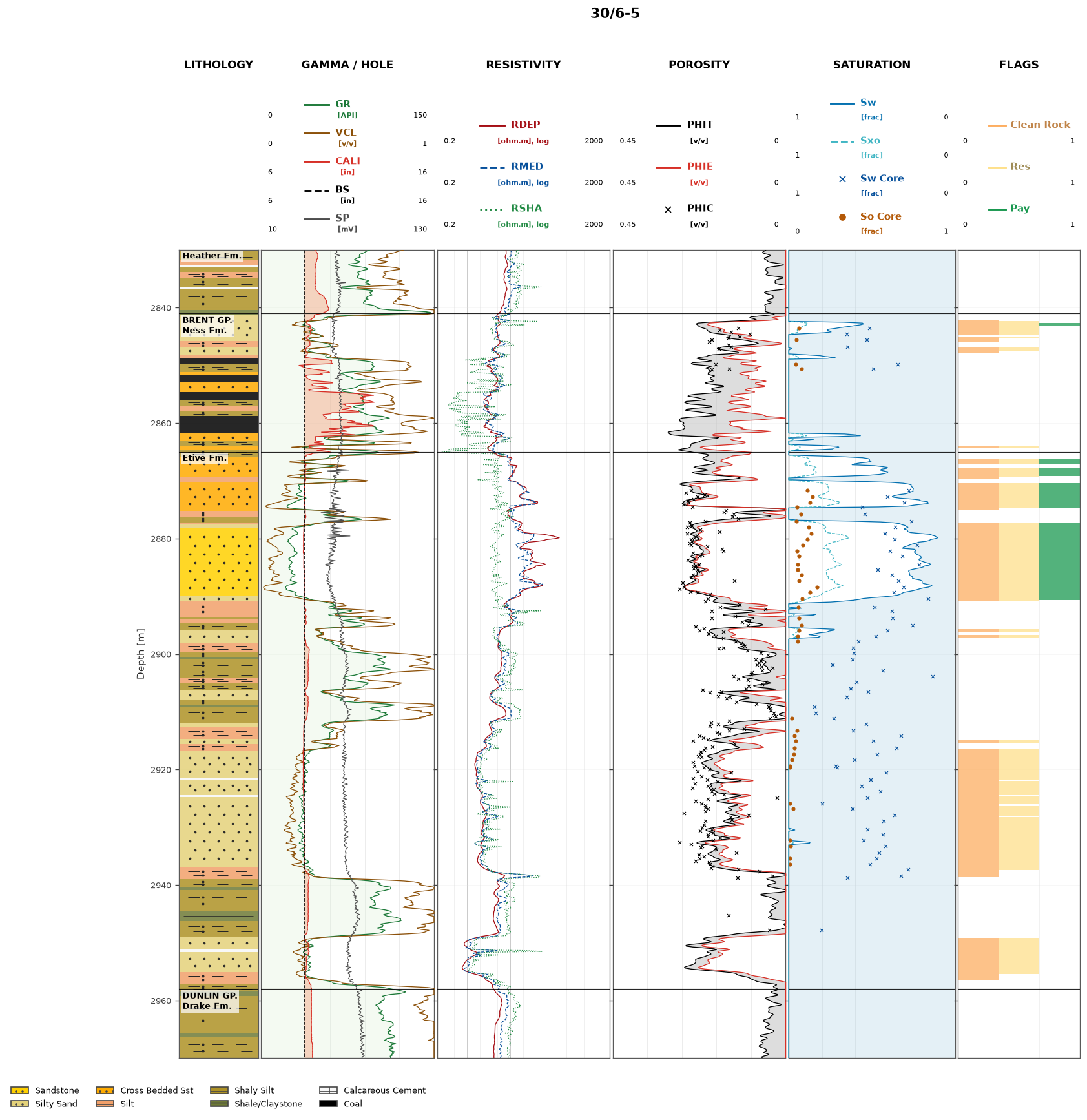
run.plot takes the options of pp.plot.
run.plot(top=2830, bottom=2970,
         tracks=["LITHOLOGY", "GAMMA / HOLE", "RESISTIVITY", "POROSITY", "SATURATION", "FLAGS"])
Try a parameter without editing the workflow
params changes a step for one run only.
pd.DataFrame({f"n = {n}": wf.run(well, params={"saturation": {"n": n}})
              .summary(top=2841, bottom=2958)["net_thickness"] for n in (1.8, 2.0, 2.2)})
| n = 1.8 | n = 2.0 | n = 2.2 | |
|---|---|---|---|
| depth_unit | m | m | m |
| net_rock | 57.150 | 57.150 | 57.150 |
| net_res | 52.120 | 52.120 | 52.120 |
| net_pay | 20.570 | 20.120 | 19.810 |
Add your own step
Decorate a function that takes the well and returns its curves.
requires is checked before running; produces gives each curve its unit.
import numpy as np

@workflow_step(requires=["PHIE", "SW", "NET_PAY"], produces={"PHIH": "v/v"})
def hydrocarbon_porosity(well, pay_only=True):
    """Hydrocarbon-filled porosity, PHIE * (1 - SW)."""
    phih = well.get("PHIE").data * (1 - well.get("SW").data)
    if pay_only:
        phih = np.where(well.get("NET_PAY").data == 1, phih, 0.0)
    return {"PHIH": phih}

wf.add(hydrocarbon_porosity())
run = wf.run(well)
run.plot(top=2841, bottom=2958, curves=["PHIE", "SW", "NET_PAY", "PHIH"],
         curve_styles={"PHIH": {"left": 0, "right": 0.3}})
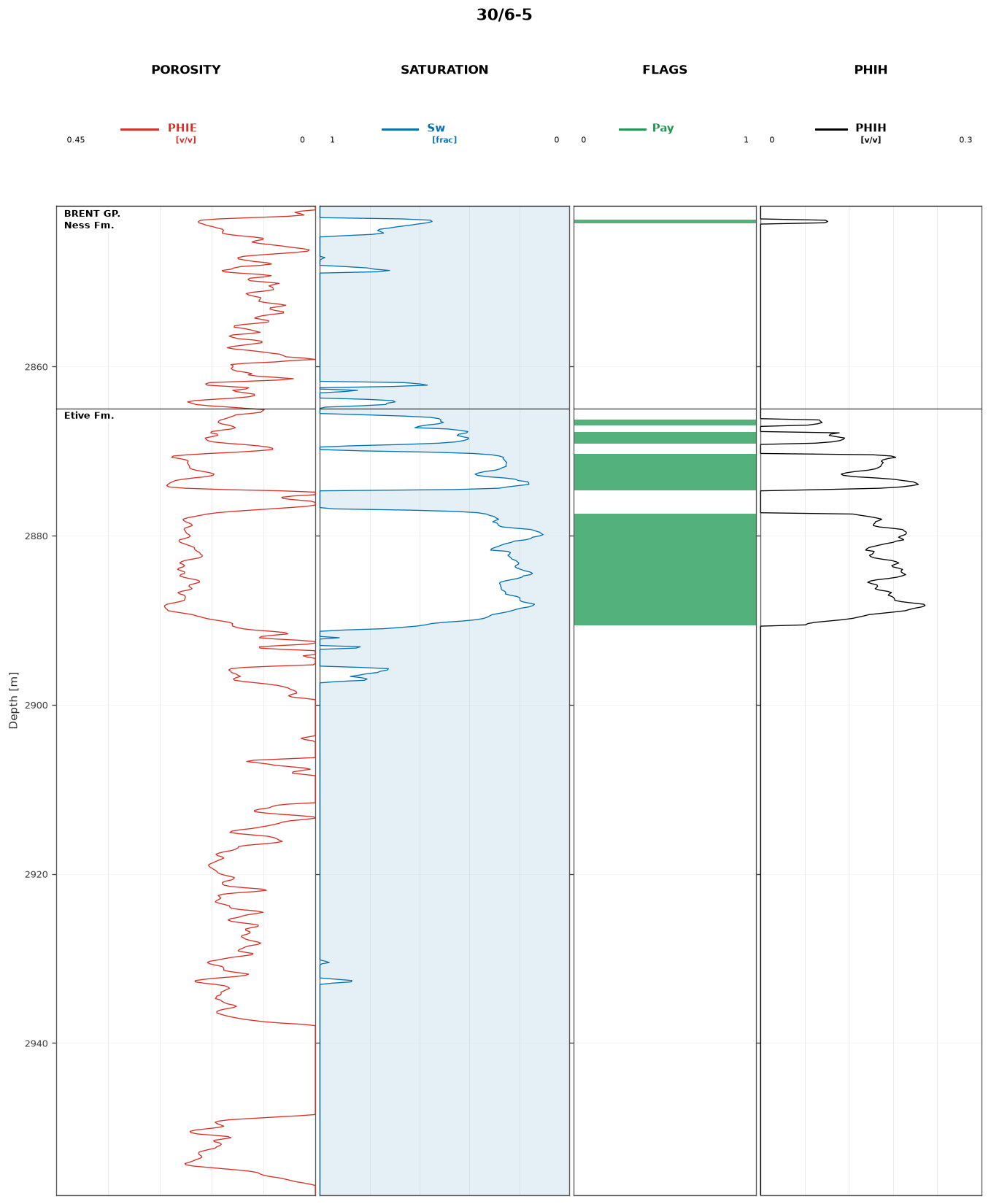
Summed over the pay of an interval and multiplied by the sample spacing, PHIH is its hydrocarbon pore thickness, the HCPV column of the formation summary: 3.1 m in the Brent Group.
run.formation_summary(rank="group")[["Formation", "Net Pay (m)", "HCPV"]]
| Formation | Net Pay (m) | HCPV | |
|---|---|---|---|
| 0 | NORDLAND GP. | 17.221 | 5.461 |
| 1 | HORDALAND GP. | 0.000 | NaN |
| 2 | ROGALAND GP. | 0.000 | NaN |
| 3 | SHETLAND GP. | 0.000 | NaN |
| 4 | CROMER KNOLL GP. | 0.000 | NaN |
| 5 | VIKING GP. | 0.000 | NaN |
| 6 | BRENT GP. | 20.117 | 3.147 |
| 7 | DUNLIN GP. | 0.000 | NaN |
The 17 m flagged in the Nordland Group is not pay. It lies at 181-335 m, in the 26 in and 36 in top hole, where the density log reads a porosity near 0.5.
pp.interpret leaves that section out as bad hole (Implausible inputs and bad hole); this recipe has no bad-hole screen, so read its totals over the reservoir interval.
Note
Saved workflows store a custom step by its import path (module:function).
Keep steps you share in a module; a step defined in a notebook reloads only in that session.
Extend pp.interpret
steps.interpret() runs the whole prebuilt workflow as one step, so your own steps can follow it.
auto_plus = Workflow("pp.interpret + hydrocarbon porosity", [
    steps.interpret(rw=0.07, rw_meas_temp="230 degF"),
    hydrocarbon_porosity(),
    steps.formation_summary(rank="formation"),
])
auto = auto_plus.run(well)
auto.artifacts["formation_summary"]
| Formation | Top | Bottom | Gross (m) | Net Rock (m) | Net Reservoir (m) | Net Pay (m) | N/G (reservoir) | Pay/Gross | Avg PHIE | ... | Avg GR | Avg RHOB | Avg NPHI | Avg RDEP | Avg PHIT | HCPV | BVW | Samples | Pay Samples | Data Coverage % | |
|---|---|---|---|---|---|---|---|---|---|---|---|---|---|---|---|---|---|---|---|---|---|
| 0 | Utsira Fm. | 726.000 | 879.000 | 153.010 | 153.010 | 0.000 | 0.000 | 0.000 | 0.000 | NaN | ... | 23.586 | 1.890 | NaN | 1.078 | 0.460 | NaN | NaN | 1004 | 0 | 100.000 |
| 1 | Balder Fm. | 1908.000 | 2023.000 | 115.062 | 81.686 | 53.950 | 0.305 | 0.469 | 0.003 | 0.288 | ... | 49.052 | 2.197 | 0.422 | 1.087 | 0.342 | 0.027 | 0.199 | 755 | 2 | 100.000 |
| 2 | Sele Fm. | 2023.000 | 2123.000 | 99.974 | 86.411 | 11.125 | 0.000 | 0.111 | 0.000 | NaN | ... | 50.667 | 2.196 | 0.433 | 0.843 | 0.347 | NaN | NaN | 656 | 0 | 100.000 |
| 3 | Lista Fm. | 2123.000 | 2203.000 | 80.010 | 77.267 | 45.720 | 0.305 | 0.571 | 0.004 | 0.384 | ... | 45.936 | 2.265 | 0.394 | 1.128 | 0.306 | 0.047 | 0.229 | 525 | 2 | 100.000 |
| 4 | Draupne Fm. | 2452.000 | 2593.000 | 140.970 | 0.000 | 0.000 | 0.000 | 0.000 | 0.000 | NaN | ... | 132.166 | 2.347 | 0.415 | 2.253 | 0.284 | NaN | NaN | 925 | 0 | 100.000 |
| 5 | Heather Fm. | 2593.000 | 2841.000 | 247.955 | 12.954 | 5.182 | 1.372 | 0.021 | 0.006 | 0.136 | ... | 78.887 | 2.514 | 0.347 | 5.054 | 0.197 | 0.081 | 0.077 | 1627 | 9 | 100.000 |
| 6 | Ness Fm. | 2841.000 | 2865.000 | 24.079 | 11.125 | 7.620 | 2.590 | 0.316 | 0.108 | 0.210 | ... | 75.012 | 2.316 | 0.310 | 4.191 | 0.253 | 0.249 | 0.113 | 158 | 17 | 100.000 |
| 7 | Etive Fm. | 2865.000 | 2958.000 | 92.964 | 65.379 | 58.369 | 23.470 | 0.628 | 0.252 | 0.220 | ... | 56.143 | 2.407 | 0.225 | 9.417 | 0.187 | 3.879 | 0.055 | 610 | 154 | 100.000 |
| 8 | Drake Fm. | 2958.000 | 3071.000 | 113.081 | 0.000 | 0.000 | 0.000 | 0.000 | 0.000 | NaN | ... | 102.970 | 2.574 | 0.297 | 4.925 | 0.155 | NaN | NaN | 742 | 0 | 100.000 |
| 9 | Cook Fm. | 3071.000 | 3123.000 | 51.968 | 9.601 | 0.762 | 0.000 | 0.015 | 0.000 | NaN | ... | 68.140 | 2.509 | 0.229 | 5.484 | 0.152 | NaN | NaN | 341 | 0 | 100.000 |
| 10 | Amundsen Fm. | 3123.000 | 3223.000 | 99.975 | 0.000 | 0.000 | 0.000 | 0.000 | 0.000 | NaN | ... | 93.941 | 2.606 | 0.264 | 5.777 | 0.130 | NaN | NaN | 656 | 0 | 100.000 |
| 11 | Statfjord Fm. | 3223.000 | 3556.000 | 332.994 | 185.775 | 46.939 | 0.762 | 0.141 | 0.002 | 0.305 | ... | 84.139 | 2.522 | 0.157 | 6.505 | 0.117 | 0.141 | 0.120 | 2185 | 5 | 99.817 |
12 rows × 23 columns
Run many wells
run_many takes wells, files or a folder, and records a failing well instead of stopping.
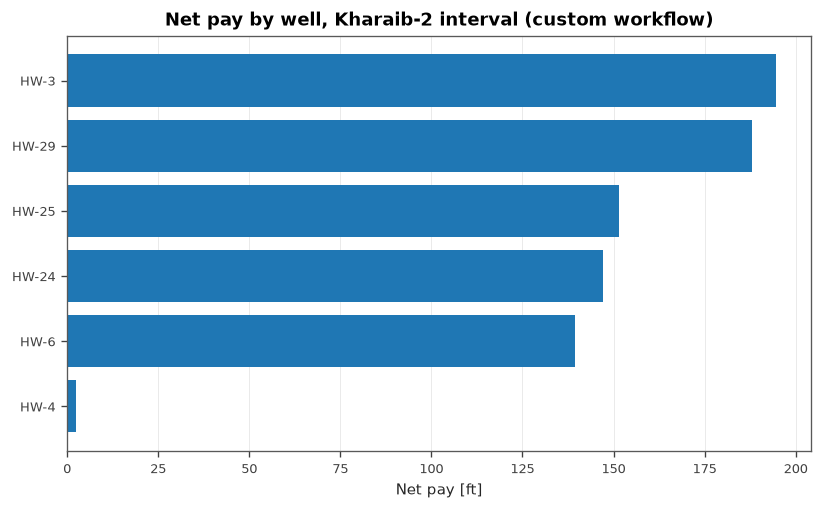
Each COSTA file covers only the Kharaib-2 carbonate interval; rw="header" reads each well’s own Rw.
carbonate = Workflow("Kharaib-2 screen", [
    steps.temperature(),
    steps.clay_volume(method="gr", gr_clean=10, gr_shale=80),
    steps.porosity(method="neutron_density", matrix="limestone"),
    steps.formation_water(rw="header"),
    steps.saturation(model="archie"),
    steps.net_pay(vcl_cutoff=0.30, phie_cutoff=0.10, sw_cutoff=0.60,
                  lithology="carbonate"),
])
names = ["HW-3", "HW-4", "HW-6", "HW-24", "HW-25", "HW-29"]
batch = carbonate.run_many([pp.sample(name) for name in names])
field = batch.summary_table()
field
| Well | Status | Steps Run | Skipped Steps | Depth Unit | Top | Bottom | Gross | Net Pay | Pay/Gross | Avg PHIE | Avg Sw | Avg VCL | Avg Perm (mD) | Error | |
|---|---|---|---|---|---|---|---|---|---|---|---|---|---|---|---|
| 0 | HW-3 | complete | 6 | ft | 7805.000 | 8020.000 | 215.500 | 194.500 | 0.903 | 0.207 | 0.133 | 0.039 | NaN | ||
| 1 | HW-4 | complete | 6 | ft | 8150.000 | 8330.000 | 180.500 | 2.500 | 0.014 | 0.178 | 0.564 | 0.043 | NaN | ||
| 2 | HW-6 | complete | 6 | ft | 7912.000 | 8120.000 | 208.500 | 139.500 | 0.669 | 0.241 | 0.256 | 0.008 | NaN | ||
| 3 | HW-24 | complete | 6 | ft | 8364.000 | 8580.000 | 216.500 | 147.000 | 0.679 | 0.240 | 0.270 | 0.001 | NaN | ||
| 4 | HW-25 | complete | 6 | ft | 8234.000 | 8440.000 | 206.500 | 151.500 | 0.734 | 0.254 | 0.096 | 0.018 | NaN | ||
| 5 | HW-29 | complete | 6 | ft | 8168.000 | 8390.000 | 222.500 | 188.000 | 0.845 | 0.281 | 0.102 | 0.016 | NaN |
pp.bar_chart(field["Well"], field["Net Pay"], horizontal=True, sort_by=0,
             xlabel="Net pay [ft]", title="Net pay by well, Kharaib-2 interval (custom workflow)",
             figsize=(8, 4.5));
Custom workflow or pp.interpret?
Custom workflow |
||
|---|---|---|
Methods |
Chosen per well from the available data |
Exactly the steps and parameters you list |
Missing inputs |
The step is skipped with a reason |
Reported before running; |
Your own calculations |
Not supported |
Any function with |
Reuse |
Settings passed on each call |
A JSON file, run on one well, a list or a folder |
Good for |
A first look at an unfamiliar well |
Project recipes, field studies, audits |
The two combine: steps.interpret() puts the automatic workflow inside your own.
Built-in steps
Step |
Calculates |
Adds |
|---|---|---|
|
Standard curve names and units |
aliases such as |
|
Formation temperature from BHT or a gradient |
|
|
Clay volume from GR, SP, neutron-density or their minimum |
|
|
Density, neutron-density, neutron or sonic porosity |
|
|
Rw and Rmf at formation temperature |
|
|
Archie or a shaly-sand model |
|
|
Timur, Coates, Wyllie-Rose ( |
|
|
RQI and FZI, bulk volume water, moveable hydrocarbons |
|
|
Cutoff flags, with each sample’s lithology-family cutoffs where none is given; evaporite, coal, halite recognized on the logs and bad-hole samples are not net reservoir or pay ( |
|
|
K-Th-U standardization and ratios |
as available |
|
The whole of |
|
|
Per-formation table |
|
Parameters and defaults are in the API reference: petrophys.workflow.steps.
steps.net_pay leaves out the same samples as pp.interpret.
summarize_pay() and calculate_net_pay() recompute the flags from the curves with one cutoff set and no exclusions, so their totals can differ from a run’s NET_PAY: summarize a run’s own flags with run.summary() or the formation_summary step.
Next
Visualization and reporting: plot the result of any workflow and export it.
Tutorial 21 builds a clastic and a carbonate workflow with your own steps, and tutorial 18 screens and ranks all seventeen COSTA wells.